How to Use Generative AI for Billing Automation
Generative AI can draft invoices, chase late payments and flag billing errors, with staff reviewing the output before money moves.
On this page
Short answer
Generative AI for billing automation means using a language model to draft invoices, summarise charges, chase late payments and flag errors in billing data, with staff reviewing the output before money moves. It works best on the repetitive writing and checking in billing, not on the payments themselves. Start with one narrow task, such as invoice summaries, and expand only after the review step proves the output is reliable.
What is generative AI billing automation?
Generative AI billing automation is the use of a language model to handle the writing and checking work in billing, such as drafting invoice notes, explaining charges to customers and spotting mismatches between orders and invoices.
It does not replace the billing system. The system of record still holds the prices, the tax rules and the payment status, and the model reads from it and writes drafts that staff review. The model is a drafting assistant, not a payment processor, and money should never move on a model's say-so alone.
The work it fits is repetitive and text-heavy: turning a list of line items into a clear invoice summary, drafting a polite reminder for a late payment, or summarising why a charge changed. These tasks take staff hours each week and follow patterns a model can learn from examples.
Where does generative AI help in billing?
Generative AI helps in billing where the work is repetitive writing or checking, and it needs a human review step wherever money, tax or a customer relationship is at stake.
| Billing task | What the model does | Human check |
|---|---|---|
| Invoice summaries | Turns line items into plain text | Check totals and terms |
| Charge explanations | Drafts replies to billing questions | Check facts before sending |
| Late payment reminders | Drafts polite follow-ups | Check tone and amounts |
| Error flagging | Spots mismatched orders and invoices | Confirm before correcting |
| Dispute summaries | Summarises the dispute history | Check the timeline |
| Report drafting | Drafts monthly billing notes | Check the numbers |
The pattern is the same in every row: the model drafts, a person checks. The time saved comes from starting with a good draft instead of a blank page, not from removing the review. For the wider picture, AI agents use cases shows where this kind of drafting help fits across a business.
How does AI invoice processing work?
AI invoice processing works by reading an invoice, pulling out the key fields, checking them against the order and the contract, and flagging anything that does not match for a person to review.
The steps are:
- Read the invoice. The model or an extraction tool pulls out the supplier, the amount, the date and the line items.
- Match it to the order. The system compares the invoice to the purchase order and the contract terms, such as the agreed price and payment date.
- Flag mismatches. A price that does not match, a missing line item or a duplicate invoice is flagged, not fixed automatically.
- Draft the summary. The model writes a short summary of the invoice and any issues, in plain language staff can act on.
- Route for review. Matched invoices go to approval, and flagged ones go to the person who can resolve them.
The model should never approve a payment on its own. Approval stays with a person, because a wrong approval is expensive and hard to undo, while a wrong draft is cheap to correct.
How do you handle disputes and late payments with AI?
You handle disputes and late payments with AI by letting the model draft the message and summarise the history, while staff decide what to send and when to escalate.
For disputes, the model can read the invoice, the order and the message history and write a short summary of what happened, what was charged and what the customer is asking for. Staff then check the summary and decide the answer, which is faster than reading the whole history from scratch.
For late payments, the model can draft reminders that match the tone you set: a gentle nudge for a first reminder, a firmer note for a second, and a final notice before escalation. Staff check the amounts and the tone before sending, because a wrong amount in a reminder damages trust and a harsh tone loses a customer. The model drafts; the person owns the message.
How to start billing automation in 5 steps
You start billing automation in five steps, beginning with one narrow task and a review step, and expanding only after the output proves reliable.
- Pick one task. Invoice summaries or late payment reminders are good first tasks, because the output is easy to check.
- Write the ground rules. State what the model may draft and what it must never do, such as approving a payment or changing a price.
- Build a small test set. Gather 50 real examples with the correct output, and score the model on them before it touches real customers.
- Add a review step. Every draft goes to a person before it is sent or filed, and the review catches the errors the model makes.
- Measure and expand. Track time saved, error rate and customer complaints for a month, then add the next task only if the numbers hold up.
Budget for the build and the running costs together. For cost context, the cost of implementing AI covers what these projects usually involve.
Example (hypothetical): automating invoice checks
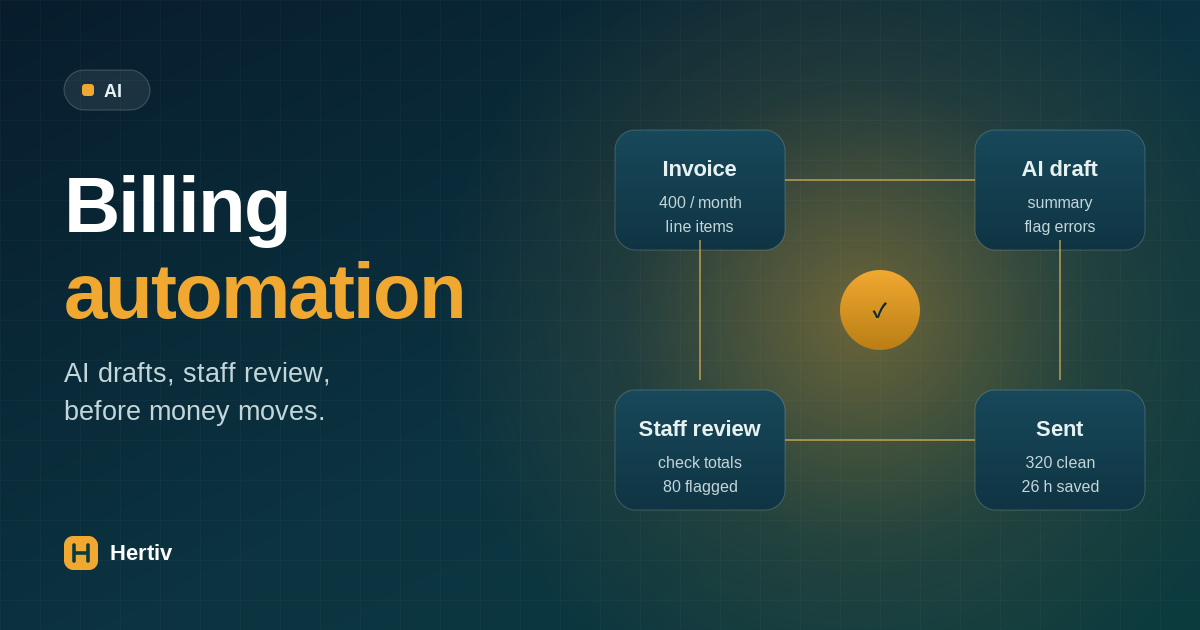
Example (hypothetical): a small business receives 400 invoices a month, and staff spend 5 minutes checking each one by hand.
Four hundred invoices at 5 minutes each is 2,000 minutes a month, which is about 33 hours. The team adds a model that reads each invoice, matches it to the order and flags mismatches, then drafts a one-line summary for each invoice.
In the first month, the model matches 320 of the 400 invoices cleanly, and staff only review the 80 flagged ones. Eighty reviews at 5 minutes each is 400 minutes, or about 7 hours, so the team saves about 26 hours a month. The flagged invoices still get a full human check, and the team reviews the model's clean matches each week to catch any errors it missed.
The saving comes from cutting the routine checks, not from removing the review. The 80 flagged invoices are the ones where a human adds real value, and the team spends its time there instead of on the 320 that were fine.
What are the common mistakes?
The most common billing automation mistakes are letting the model approve payments, skipping the review step, and feeding it messy data that makes the output unreliable.
- Letting the model approve payments. Money should only move on a person's approval, because a wrong payment is expensive to undo.
- Skipping the review step. A draft that goes out unchecked will eventually contain a wrong amount or a wrong name.
- Messy billing data. If orders, prices and contracts do not match, the model will draft from bad data and the output will be wrong.
- Automating disputes first. Disputes need judgement and a customer relationship, so start with invoice summaries, not disputes.
- No fallback for errors. When the model is unsure, it must flag the case for a person, not guess and carry on.
- Ignoring the cost of review. Review time is real work, so measure the net time saved, not just the drafts produced.
Key takeaways
- Generative AI drafts billing text; staff review it before money moves
- Start with invoice summaries or payment reminders, not disputes
- The model flags mismatches; it never approves a payment on its own
- Build a small test set and measure time saved, errors and complaints
- Messy billing data makes the output unreliable, so fix the data first
Frequently asked questions
Can generative AI send invoices by itself?
It can draft an invoice summary and prepare the message, but a person should check the totals, terms and recipient before it goes out. Money and billing documents should never move on a model's say-so alone.
What billing tasks can AI automate first?
Invoice summaries, charge explanations and late payment reminders are the best first tasks, because the output is easy to check and the risk is low. Disputes and payment approvals should stay with staff.
How accurate is AI invoice processing?
Accuracy depends on the quality of your invoices and orders. With clean data, a model can match most invoices correctly, but it will still miss some, which is why flagged cases and a weekly review of clean matches matter.
Does billing automation replace the finance team?
No. It removes repetitive drafting and checking so the team can spend time on disputes, exceptions and customer conversations. The review step and the judgement calls always stay with people.
How much does generative AI billing automation cost?
Cost depends on volume, the model used and the review time. Start with one task, measure the time saved and the error rate for a month, and expand only if the numbers hold up. See vendor site for current model pricing.
What data does the AI need for billing automation?
It needs clean orders, contracts, prices and payment records, because the model drafts from that data. If the data is messy or out of date, the output will be wrong, so fix the data before automating the writing.


