What Is System Testing, and How Do You Do It?
System testing checks a complete, integrated application as a whole before release. Learn how it differs from unit and integration testing and how to run it.
On this page
Short answer
System testing is the testing of a complete, integrated application as a whole, checking that it meets its requirements before it is released to users. It runs on the finished product, in an environment close to production, and it covers both what the system does and how well it does it.
What is system testing?
System testing is the testing of a complete, integrated application as a whole, checking that it meets its requirements before it is released to users. It runs on the finished product, in an environment close to production, and it covers both what the system does and how well it does it.
Unlike unit testing, which checks single functions, or integration testing, which checks how parts work together, system testing treats the application as one thing. The tester uses it the way a user would: logging in, completing tasks, and checking that the results match what was asked for.
System testing is usually done by a tester or a test team, not by the developer who wrote the code. A fresh pair of eyes finds the problems the developer no longer sees, such as a confusing flow, a missing error message, or a step that works only when done in one exact order.
It is also the last full check before release. After system testing, the only step left is usually acceptance testing, where the customer or product owner confirms the system does what they asked for. For help setting up that process, custom software development teams usually plan testing from the first sprint.
System testing vs unit and integration testing
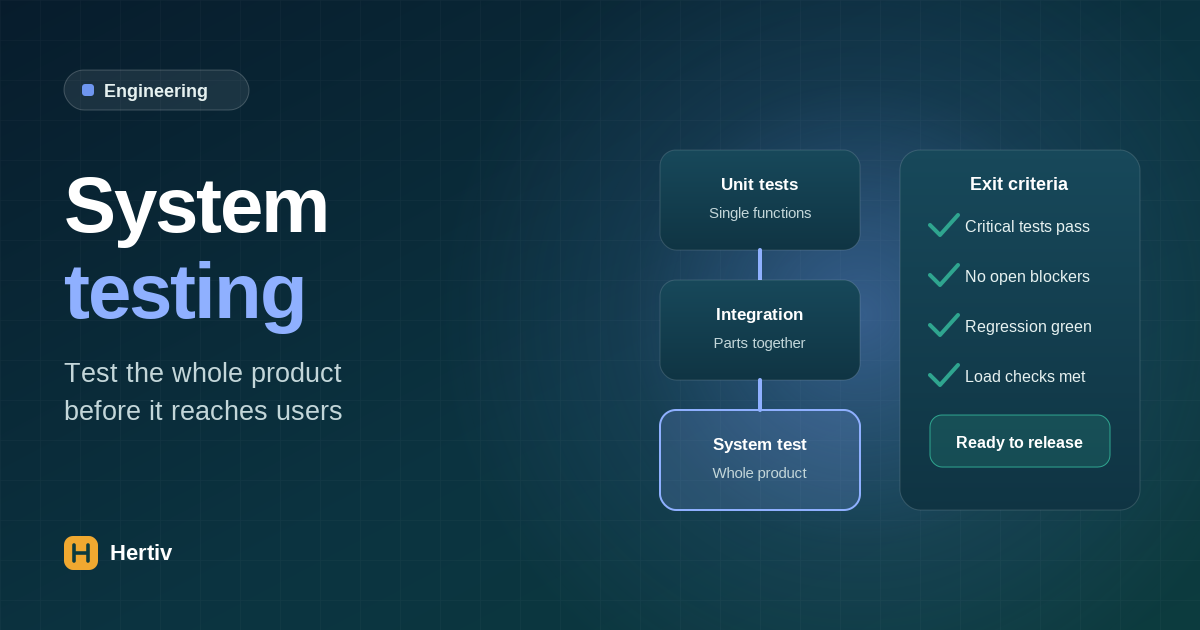
System, unit and integration testing check different things at different times. Unit testing checks the smallest pieces, integration testing checks how they connect, and system testing checks the whole product against its requirements.
| Level | What it tests | Who runs it | When |
|---|---|---|---|
| Unit | Single functions and classes | Developers | While coding |
| Integration | How parts work together | Developers | As parts join up |
| System | The whole product end to end | Testers | Before release |
| Acceptance | Whether it meets the brief | Customer or owner | At sign-off |
Each level catches different bugs. Unit tests catch logic errors in one function, integration tests catch mismatched interfaces, and system tests catch the problems that only appear when everything runs together, such as a slow page, a broken flow, or data that disappears between steps.
Skipping a level does not save time; it moves the bugs to a later, more expensive stage. A bug found in system testing costs more to fix than one found in a unit test, because the developer must find it in the whole product first. A unit testing guide covers the earliest level in more detail.
What does system testing cover?
System testing covers two kinds of checks: functional and non-functional. Functional testing checks that the system does what the requirements say, while non-functional testing checks how well it does it, under load, under attack and under failure.
Functional checks follow the requirements one by one: can a user register, log in, complete a purchase, cancel it, and get a refund? Each requirement becomes one or more test cases, and each test case has an expected result that the tester compares against what actually happens.
Non-functional checks cover the qualities users feel but rarely list: speed, reliability, security and usability. A page that takes ten seconds to load, a system that falls over when ten users log in at once, or a password field that accepts a one-letter password are all system testing failures, even if every feature works.
Usability is part of it too. A flow that works but confuses users is a defect, not a matter of taste, because confused users make mistakes, call support, or leave. Testers check the flow with fresh eyes, which is something the team that built it cannot do.
How do you run system testing?
You run system testing by preparing the environment, the data and the test cases first, then running them in order, and fixing what fails before the next round. The preparation matters as much as the running.
- Set up the environment. Build a test system that matches production as closely as possible: same versions, same settings, same data shapes.
- Prepare the test data. Create accounts, orders and records that cover the normal cases and the edge cases, such as expired cards and empty fields.
- Write the test cases. Turn each requirement into steps with an expected result, so any tester can run the same test the same way.
- Run the tests in order. Start with the core flows, then the edge cases, then the non-functional checks such as load and security.
- Log every failure. Record what happened, what was expected, and the steps to repeat it, so the developer can fix it once.
- Retest and regress. After each fix, rerun the failed tests and a set of passing ones, to catch fixes that break something else.
Keep the test cases with the requirements, so a change to a requirement shows which tests must change. A functional vs integration testing comparison helps a team decide which level each test belongs to.
Example (hypothetical): testing a booking app
Example (hypothetical): a team tests a booking app with 240 test cases covering search, booking, payment, cancellation and refunds. On the first run, 216 pass and 24 fail, which is 216 divided by 240, or 90% passing.
The team fixes the 24 failures, which turn out to be 9 real bugs and 15 test cases written against an old requirement. After the fixes and the corrections, a second run passes 234 of 240, which is 234 divided by 240, or 97.5%.
The remaining 6 failures are minor display issues on one screen size, which the team records and fixes in the next sprint. The numbers are invented to show the arithmetic, not a real test run. The point is that the pass rate is only useful when the failures are understood, not just counted.
The team also runs a regression set of 60 passing tests after each fix, to catch fixes that break something else. That set takes 30 minutes to run, which is cheap compared with a bug that reaches users.
What are the common mistakes?
The most common mistakes in system testing start with testing too late. A team that writes the tests after the code is finished finds the bugs when they are most expensive to fix, and often ships with known failures because there is no time left.
- Testing on the wrong data. Clean test data hides the messy cases real users bring, such as long names, expired cards and empty fields.
- No traceability. When tests are not linked to requirements, nobody knows which requirement a failing test covers, or which tests a change affects.
- Skipping non-functional tests. A system that works for one user and fails for ten is not ready, however many functional tests pass.
- Testing in the wrong environment. A test system that differs from production hides the bugs that only appear in production.
- Counting passes instead of understanding failures. A 95% pass rate means little if the 5% that fail are the payment flow.
Avoiding these mistakes is mostly a matter of starting early. Write the test cases with the requirements, run them in an environment close to production, and treat every failure as a question, not a number. A API testing guide covers the same habits at the interface level.
How do you know system testing is done?
System testing is done when the exit criteria are met, not when the calendar says so. The criteria are agreed before testing starts, so the decision to release is a check, not an argument.
The usual criteria are simple: all critical and high-priority test cases pass, there are no open critical defects, the regression set passes, and the non-functional checks, such as load and security, meet their targets. Minor defects can be recorded and fixed later, as long as the decision is written down.
The product owner signs off against those criteria, not against a feeling. If a criterion is not met, the release waits, or the criterion is changed in writing with a reason. A release that goes ahead with a failed criterion and no written decision is how teams ship bugs they already knew about.
After release, the test cases stay. They become the regression set for the next release, so the work of this round pays for the next one. A test suite that grows with the product is an asset; one that is thrown away after each release is a cost paid twice.
Key takeaways
- System testing checks the whole product, not single functions
- Unit, integration, system and acceptance testing each catch different bugs
- Functional and non-functional checks both matter before release
- Write test cases with the requirements, and link each test to one
- Release when the exit criteria are met, not when the calendar says so
Frequently asked questions
When should system testing start?
System testing starts when the product is integrated enough to run end to end, usually late in the build. The preparation, such as writing test cases and setting up the environment, should start much earlier, alongside the requirements.
Who should do system testing?
A tester or test team, not the developer who wrote the code. A fresh pair of eyes finds the problems the developer no longer sees, and the tester can judge the product the way a user would, without knowing how it works inside.
What is the difference between system testing and acceptance testing?
System testing checks the product against its requirements, while acceptance testing checks it against the customer's brief. System testing is done by testers; acceptance testing is done by the customer or product owner, as the final sign-off.
How many test cases does system testing need?
As many as the requirements need. Each requirement becomes one or more test cases, and the edge cases add more. A small app might need a few dozen; a large one can need thousands. The count follows the requirements, not a target.
Can system testing be automated?
Partly. Repetitive checks such as regression tests and load tests are often automated, while exploratory testing, usability and anything that needs judgement stay manual. Most teams automate the checks they repeat and keep people for the checks that need thinking.
What happens to bugs found in system testing?
Each bug is logged with steps to repeat it, the expected result and the actual result, then ranked by severity. Critical bugs block the release, while minor ones can be recorded and fixed later, as long as the decision is written down.


