Microservices Examples: 6 Systems Split Into Services
Microservices split one large app into small services that each own one job. See how six everyday systems split their work, and what each split buys the team.
On this page
Short answer
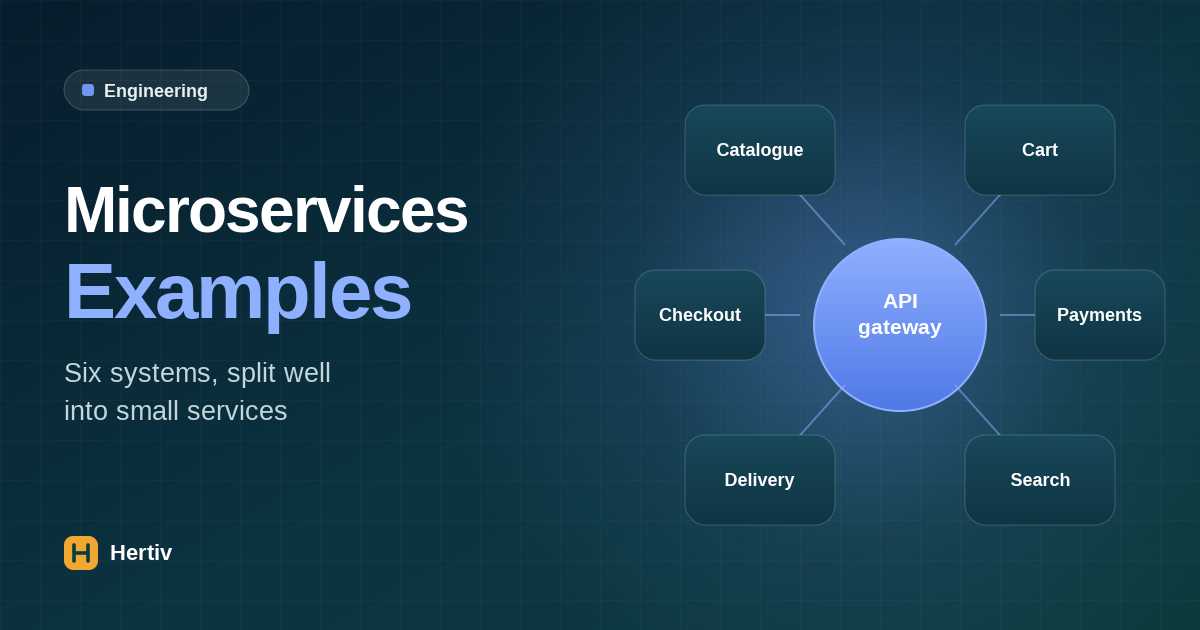
Microservices examples show one large application broken into small services that each own a single job, such as search, payments or user accounts. An online store might run separate services for the catalogue, the cart, checkout and delivery tracking, so each team can change, test and scale its own service without touching the rest.
Which systems split into microservices?
Every system below started as one large application and split into services when one part of the work grew faster than the rest. The split follows the same idea each time: find the jobs that change at different speeds, and give each its own service, its own data and its own team.
The examples are ordinary systems most people use every week. For each one, the table shows the services it splits into and the reason for the split, then the sections below look at what each split makes easier and what it makes harder.
| System | Services it splits into | Why split |
|---|---|---|
| Online store | Catalogue, cart, checkout, payments, delivery | Checkout peaks at sale time |
| Food delivery | Menu, orders, rider tracking, payments | Orders spike at meal times |
| Online bank | Accounts, transfers, cards, fraud checks | Fraud checks change often |
| Streaming service | Catalogue, search, playback, billing | Playback load is huge and steady |
| Ride-hailing | Matching, pricing, maps, payments | Pricing changes by the minute |
| Hotel booking | Search, rooms, pricing, bookings, reviews | Search load dwarfs bookings |
Online store and food delivery
1. Online store: best for showing how checkout splits from browsing
An online store splits into a catalogue service, a cart service, a checkout service, a payments service and a delivery tracking service. Browsing the catalogue is the busiest job, but checkout is the job that must never fail, so the two run apart and scale apart.
The split pays off at sale time. The catalogue service can slow down under a flood of visitors while checkout keeps working, because the two do not share the same code or the same database. Teams can also change the checkout flow without touching the catalogue.
Pros: checkout stays up when browsing floods; each team ships on its own schedule.
Cons: an order now spans several services, so tracing a failed order takes more work.
2. Food delivery: best for showing how tracking splits from ordering
A food delivery app splits into a menu service, an orders service, a rider tracking service and a payments service. Orders spike at lunch and dinner, while rider tracking runs all day, so the two jobs need different amounts of capacity at different times.
The split lets the team fix one job without stopping the others. If the tracking map has a fault, orders and payments keep working, and the team can fix the map service on its own. Microservices use cases covers more jobs that suit this split.
Pros: a fault in tracking does not stop orders; each service scales to its own peak.
Cons: keeping the order, the rider and the payment in step needs careful design.
Online bank and streaming service
3. Online bank: best for showing how fraud checks split from accounts
An online bank splits into accounts, transfers, cards and fraud checks. Fraud rules change often as new tricks appear, while the accounts service changes rarely, so keeping them apart means the bank can update fraud rules every week without touching customer accounts.
The split also helps with safety. The fraud service can be given narrow access to just the data it needs, and the accounts service can be locked down tightly. A fault in one service does not hand over the keys to the other.
Pros: fraud rules update fast; sensitive services stay tightly guarded.
Cons: a transfer now crosses services, so the team must handle half-finished transfers.
4. Streaming service: best for showing how playback splits from billing
A streaming service splits into a catalogue service, a search service, a playback service and a billing service. Playback carries the heaviest load by far, running all day and night, while billing runs in short bursts once a month, so the two need very different setups.
The split means a billing fault never stops anyone watching. The playback team can also test new video quality settings on its own service, without waiting for the billing team to finish its own work. What microservices are explains the basic idea behind this split.
Pros: playback keeps running through billing faults; each team tests on its own.
Cons: the catalogue, search and playback must agree on what each title is called.
Ride-hailing and hotel booking
5. Ride-hailing: best for showing how pricing splits from matching
A ride-hailing app splits into matching, pricing, maps and payments. Pricing changes by the minute as demand rises and falls, while matching changes slowly, so the pricing service can be updated and scaled on its own while matching stays steady.
The split lets the pricing team test new fare rules on a small share of rides without touching the matching service. If a pricing test goes wrong, only the test rides are affected, and the team can roll the change back in minutes.
Pros: fare rules change fast and safely; pricing scales to rush hour alone.
Cons: matching and pricing must agree in real time, or riders see the wrong fare.
6. Hotel booking: best for showing how search splits from bookings
A hotel booking site splits into search, rooms, pricing, bookings and reviews. Search is the busiest job by far, since most visitors search many times and book once, so the search service gets far more capacity than the booking service.
The split also lets the search team improve results without touching money. New ranking rules can go live in the search service while bookings keep working exactly as before, and a search fault leaves existing bookings safe. Microservices vs monolithic architecture compares this approach with keeping everything in one app.
Pros: search scales far beyond bookings; ranking changes ship without touching payments.
Cons: room prices in search results can drift from the price at booking time.
How to choose your first split
Choose your first split by finding the job that changes fastest or fails loudest, and split that one job out first. A team that splits everything at once spends months on plumbing and learns nothing; a team that splits one job learns the pattern and can repeat it.
- List the jobs. Write down what the app does, such as search, orders, payments and tracking, and note which jobs change often and which rarely change.
- Find the pain. Pick the job that causes the most incidents, the slowest releases or the biggest scaling bills.
- Draw the boundary. Give the service one job, its own data and a clear way for other services to talk to it.
- Split one service. Move that one job out, keep the rest as it is, and run both side by side until the new service proves itself.
- Measure the result. Check whether releases got faster, faults got smaller and the bill stayed fair before splitting the next job.
If the first split makes life harder, that is useful news too. Some systems are small enough that one application is the right answer, and the split can wait until the pain comes back.
What are the common mistakes?
The most common mistake is splitting by technical layer instead of by job. A team that splits into a database service, a logic service and a display service has not split at all: every change still touches all three. Split by business job, such as orders or payments, so a change lands in one place.
The second mistake is sharing one database between services. Shared data ties the services back together, so a change to one table breaks the others. Each service should own its own data, even if that means the same fact lives in two places.
The third mistake is splitting too much, too soon. A system of twenty tiny services is harder to run than one large app, and a small team cannot watch them all. Start with two or three services and split further only when a service grows too big to change safely.
Key takeaways
- Each service owns one job, its own data and its own team
- Split the job that changes fastest or fails loudest first
- Split by business job, never by technical layer
- One shared database ties services back together
- Start with two or three services, then split further
Frequently asked questions
What is a microservices example?
A microservices example is a real system, such as an online store, split into small services that each own one job. The store might run separate services for the catalogue, the cart, checkout, payments and delivery tracking, each with its own team and data.
Why do companies split into microservices?
They split so each job can change, fail and scale on its own. Checkout can stay up while browsing floods, fraud rules can update weekly without touching accounts, and one team can ship without waiting for every other team.
What is the simplest microservices example?
An online store is the simplest example to picture: catalogue, cart, checkout, payments and delivery. Each service does one job, talks to the others through clear requests, and can be fixed or scaled without stopping the rest.
Do microservices always help?
No. A small app with one team is often simpler and cheaper as a single application. Microservices pay off when different jobs change at different speeds, need different capacity, or are owned by different teams.
How many services should a system have?
Start with two or three, split from the jobs that hurt most. Add more only when a service grows too big to change safely. Twenty tiny services are harder to run than one large app, so the count should follow the pain.
What goes wrong when services share a database?
A shared database ties the services back together, so a change to one table can break the others. Each service should own its own data, even if that means the same fact is stored in two places.


