How to Integrate ChatGPT Into Your Website
Adding ChatGPT to a website means connecting a chat box to the OpenAI API, with limits on cost, data and answers. Learn the six steps and the safety checks.
On this page
Short answer
To integrate ChatGPT into your website, add a chat box to a page, send the visitor's message to the OpenAI API from your server, and show the reply in the chat box. You also need an API key, a system prompt that tells the model how to behave, and limits on cost and on what the model may say, so the chat stays helpful and safe.
What does adding ChatGPT to a website mean?
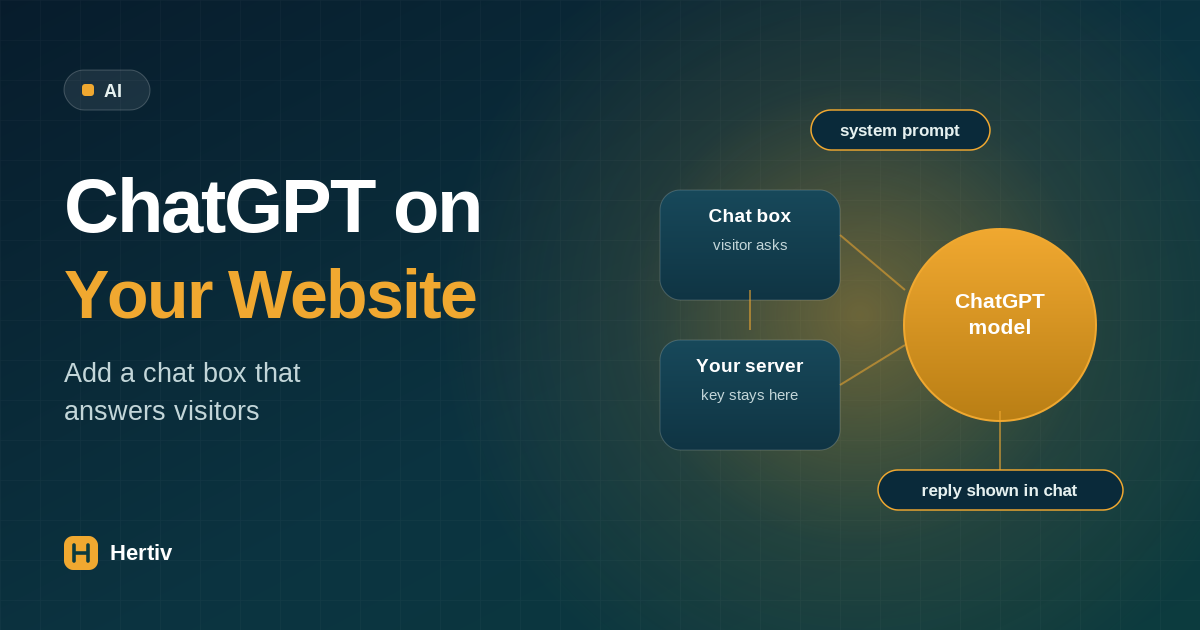
Adding ChatGPT to a website means giving visitors a chat box that answers in plain words, powered by the OpenAI API. The visitor types a question, the website sends it to the model, and the model writes a reply that the website shows in the chat box. The model does the writing; your website does the asking, the showing and the guarding.
The chat box is only the front of the work. Behind it sit four parts that decide whether the chat is useful: a chat box on the page, a server that talks to the API, a system prompt that tells the model how to behave, and limits on cost, data and answers. Get those four right and the chat feels like a helpful member of staff.
The model answers from what it knows and from the facts you give it in the prompt. It does not know your prices, your stock or your opening hours unless you send that information with each question, so the first job is deciding what facts the chat needs and where they come from.
| Part | What it does | Where it lives |
|---|---|---|
| Chat box | Shows messages and takes questions | On the web page |
| Server | Sends questions to the API, keeps the key safe | Your own server |
| System prompt | Tells the model its role, tone and limits | Sent with each request |
| Guardrails | Block bad input, check answers, cap cost | On your server |
| Knowledge | Facts the model needs, such as prices | Your pages or help centre |
What do you need before you start?
Before you write any code, you need an OpenAI account with an API key and a spending limit set. The key is a password for your account, so it must live on your server, never in the web page, where any visitor could read it and spend your money.
Next, decide what the chat is for. A chat that answers delivery questions needs your delivery facts; a chat that helps visitors pick a product needs your catalogue; a chat that drafts support replies needs your help pages. One clear job beats a chat that tries to do everything.
Also decide what the chat must never do. It should never invent prices, promise refunds, share personal data or answer questions outside its job. Write these limits into the system prompt, and plan a way for visitors to reach a person when the chat cannot help.
How to integrate ChatGPT into your website
Integration takes six steps, and most of the work is in the prompt and the guardrails, not in the chat box itself. Follow the steps in order, and test after each one.
- Add the chat box. Put a simple chat box on the page that sends the visitor's message to your server and shows the reply. Keep the design plain: a text field, a send button and a message list.
- Connect your server to the API. Your server takes the message, adds your system prompt and any facts the model needs, and sends it to the OpenAI API with your key. The key never leaves your server.
- Write the system prompt. Tell the model its role, its tone, what it may say and what it must not say. Include a line that says to admit when it does not know, and to offer a human instead of guessing.
- Add your facts. Send the facts the model needs with each question, such as the relevant help page text or product details, so answers come from your business, not from the model's memory.
- Add guardrails. Cap the number of messages per visitor, cap the length of replies, filter out abusive input, and log every conversation so you can review what the chat said.
- Test, then launch to a few visitors. Try the questions real visitors ask, fix the prompt where answers go wrong, and open the chat to a small share of visitors before turning it on for everyone.
Keep the first version small. A chat that answers five common questions well is worth more than a chat that tries to answer everything and invents half of it. Building an AI proof of concept uses the same start-small approach for first AI projects.
How do you keep answers safe and on topic?
Safe answers start with the system prompt, which should name the job, the tone and the limits in plain words. A prompt that says "You answer delivery questions for a small online shop, using only the facts given here. If you do not know, say so and offer email support" will beat a long list of rules that nobody reads.
Add a second check on your server. Before showing a reply, check it against your facts: does the price match your price list, does the delivery time match your policy, does it contain anything it should not? If a check fails, show a safe fallback reply and send the visitor to a person.
Log every conversation and read a sample each week. The logs show which questions visitors really ask, where the chat invents answers, and where the prompt needs a clearer rule. A chat that nobody reviews will drift, and the drift shows up as confident wrong answers. How GPT works explains why a model can sound sure while being wrong.
Example (hypothetical): a support chat for a small shop
Example (hypothetical): a small online shop gets 300 chat questions a day, and a person answers each in about 5 minutes. That is 300 × 5 minutes = 1,500 minutes, or 25 hours of staff time a day, spread across the support team.
The shop adds a ChatGPT chat box that drafts answers from its help pages, and a person reviews each draft before it is sent. Review takes about 1 minute per question, so the team spends 300 × 1 minute = 300 minutes, or 5 hours a day, instead of 25. That saves about 20 hours a day.
The chat also uses tokens. If each question and answer together use about 1,500 tokens, the day uses 300 × 1,500 = 450,000 tokens. The team sets a daily spending cap on the API key, watches the first week's use, and adjusts the cap before the chat goes live for all visitors.
How do you test it before launch?
Test with the questions real visitors ask, not the questions you wish they asked. Take the last hundred support messages, run them through the chat, and read every answer. Mark each one as right, wrong or partly right, and fix the prompt for the wrong ones.
Try the awkward cases too: a visitor asking for a discount that does not exist, a question about a product you stopped selling, and a message in another language. The chat should say it does not know, offer a person, and never invent a price or a promise.
Test the cost as well. Run a full day of test traffic and check the token use and the bill, then set the spending cap a little above that level. A cap that is too low stops the chat at lunch; a cap that is missing can run up a bill nobody planned for. Using AI in customer service covers the wider checks for AI support tools.
What are the common mistakes?
The most common mistake is putting the API key in the web page. Any visitor can read it from the page source and use it to run up your bill. The key belongs on your server, and the web page should only ever talk to your server.
The second mistake is letting the chat answer from memory instead of from your facts. A model will invent a plausible price or delivery time if you do not give it the real ones, and visitors will hold you to the invented answer. Always send the facts with the question.
The third mistake is launching to everyone at once. A small launch to a few visitors shows up the prompt gaps, the cost surprises and the questions you did not expect, while a full launch shows them up in front of every visitor at once.
Key takeaways
- The API key lives on your server, never in the page
- Send your facts with each question, or the model invents them
- Start with five questions done well, not everything at once
- Log chats and read a sample every week
- Launch to a few visitors before turning it on for all
Frequently asked questions
How much does it cost to add ChatGPT to a website?
The cost is the API use, which is charged by the token, plus the work to build the chat box and the prompt. A small chat answering a few hundred questions a day usually costs a few dollars a day in API use, but set a spending cap and check the first week's bill.
Do I need to know how to code?
Yes, for the basic version: someone must add the chat box to the page and connect a server to the API. No-code chat tools exist, but they give you less control over the prompt, the facts and the spending cap.
Can ChatGPT answer from my own help pages?
Yes. Send the relevant help page text with each question, so the model answers from your pages instead of from its memory. This is the single most useful step for keeping answers right.
Is it safe to let ChatGPT talk to customers?
It is safe when the key stays on your server, the prompt sets clear limits, answers are checked against your facts, and visitors can reach a person. Without those checks, the chat can invent prices or promises.
What model should I use?
Start with a mid-range model that balances cost and quality for short answers, and test it on real questions before choosing. A larger model is not always better for a chat that answers from your own facts.
How do I stop the chat from inventing answers?
Tell the model in the system prompt to say it does not know when the facts are missing, send your facts with each question, and check replies against your price and policy lists before showing them.


