How to Use AI Customer Service: A Practical Guide
AI customer service answers routine questions, drafts replies and routes tickets. Learn where to start, how to set it up, and how to keep quality high.
On this page
Short answer
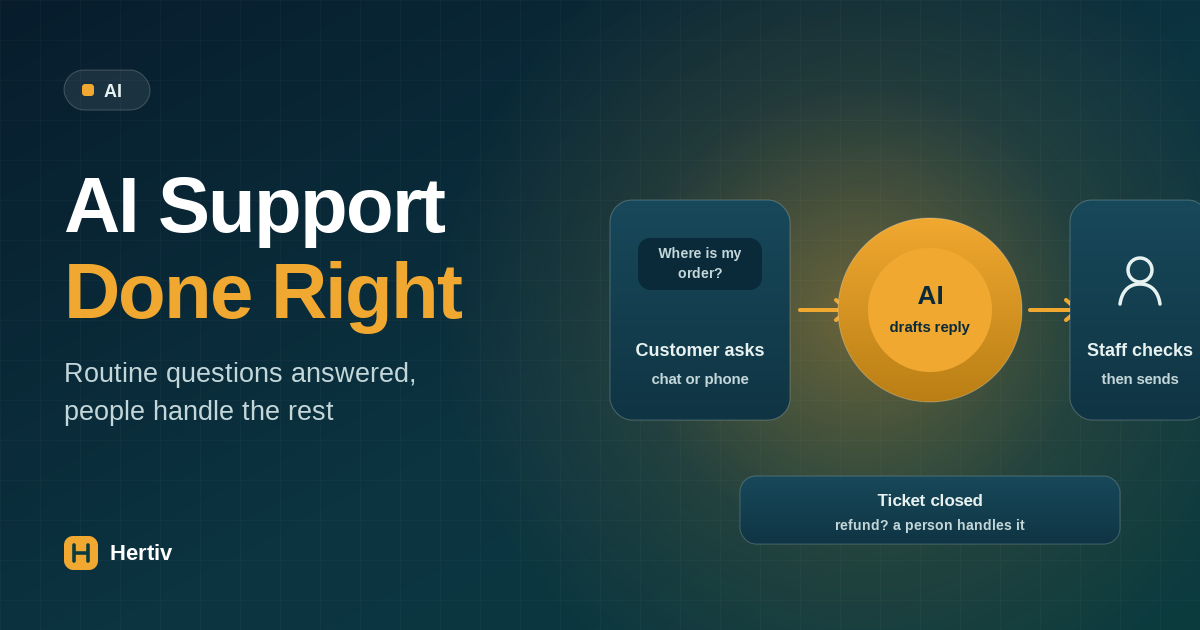
Using AI in customer service means letting software answer routine questions, draft replies and route tickets, with people handling the cases that need judgement. Start with one channel and a small set of questions, ground answers in your own help content, and measure resolution time and customer satisfaction before you expand.
What is AI customer service?
AI customer service is the use of software to handle part of the work in a support team: answering routine questions, drafting replies for staff, sorting tickets and finding the right help article. The goal is to resolve simple cases fast and give staff more time for the cases that need judgement.
It is not a replacement for the support team. The cases that involve refunds, complaints, legal questions or upset customers still need a person. AI handles the repeatable work in front of them, and hands off cleanly when it cannot help.
The common building blocks are:
| Building block | What it does | Who sees it |
|---|---|---|
| Chat assistant | Answers questions on site or app | Customers |
| Drafting copilot | Drafts replies for staff to send | Support staff |
| Ticket routing | Sorts tickets by topic and urgency | Support staff |
| Knowledge search | Finds the right help article | Staff and customers |
| Voice agent | Handles phone calls and voicemail | Customers |
Teams that already have a clean help centre and a ticket history have a head start, because those are the raw materials the AI learns from. For the agent pattern behind this, AI agents for customer support covers the design in depth.
Where does AI customer service help most?
AI customer service helps most where questions repeat, answers already exist somewhere, and a wrong answer is caught before it reaches the customer. Order status, password resets, delivery times and plan changes are the classic first cases.
It helps least where the answer needs judgement, access to sensitive systems, or a conversation about a complaint. Those cases should go to a person quickly, not after the customer has argued with a bot for ten minutes.
Good first use cases:
- Status questions. Order, delivery and account status, where the answer comes from a system, not a guess.
- How-to questions. Setup, configuration and common fixes, where a help article already exists.
- Drafting. The AI drafts a reply and a staff member checks it before sending.
- Routing. Tickets are sorted by topic and urgency, so the right person sees them first.
- After-hours cover. Simple questions get answered outside office hours, with handoff in the morning.
Pick the use case by volume and by how easy it is to check. A question asked 500 times a month with a clear answer is a better start than a rare question with a complicated one.
How do you set up AI customer service?
You set up AI customer service by cleaning the content it will answer from, connecting it to one channel, and testing it on real questions before customers see it. The content matters more than the model.
- Clean the help centre. Remove outdated and duplicate articles. If two articles give different answers, the AI will surface both.
- Collect real questions. Take the last few months of tickets and list the most common questions with their known good answers.
- Connect one channel. Start with chat on the website or in the app, not with every channel at once.
- Set the handoff rules. Define exactly when the AI hands off: billing disputes, complaints, legal questions, and any topic it cannot answer with a source.
- Test before launch. Run the real questions through the system and check the answers against the known good ones.
- Go live with review. Have staff review the AI's answers for the first weeks, and fix the content behind any wrong answer.
Grounding is the key idea: the AI should answer from your help articles and ticket history, not from general knowledge. Answers with a cited source are easier to trust and easier to fix when they are wrong.
How do you keep quality high after launch?
You keep quality high after launch by reviewing answers, tracking the right metrics and fixing the content behind mistakes. The system does not improve on its own; it improves when someone acts on what the reviews show.
The review routine that works:
- Sample answers weekly. Read a sample of AI answers and mark which were right, wrong or incomplete.
- Track resolution, not volume. Measure how many cases were resolved without a person, and how many were handed off.
- Watch customer satisfaction. Compare satisfaction for AI-handled cases with staff-handled ones, and look for gaps.
- Fix the source, not the prompt. When an answer is wrong, update the help article it came from, so the fix lasts.
- Log everything. Keep the question, the sources used, the answer and the human decision, so failures can be traced.
Set a threshold for escalation. If the AI cannot answer with a source, or the customer repeats the question, it should hand off immediately. A fast handoff beats a confident wrong answer every time.
For teams planning a proof of concept, how to build an AI proof of concept shows how to scope and measure a first project.
Example (hypothetical): a retailer answers routine questions
Example (hypothetical): a retailer receives 500 support tickets a day. About 60% are routine: delivery status, returns and password resets. That is 300 routine tickets a day.
Each routine ticket takes a staff member about 6 minutes to answer by hand, which is 300 times 6 minutes, or 30 hours a day across the team. The retailer adds a chat assistant grounded in its help centre, and staff review its drafts before they are sent.
Reviewing a draft takes about 1 minute, so the 300 tickets now take 300 minutes, or 5 hours a day. The team saves about 25 hours a day, and the remaining tickets, the ones that need judgement, get faster attention because the queue is shorter.
The retailer keeps the handoff rules strict: any mention of a refund, a complaint or a legal issue goes straight to a person. Satisfaction is measured weekly, and the help articles behind wrong answers are fixed the same week.
How do you measure whether it is working?
You measure AI customer service by outcomes, not by how many people used it. Usage can rise while quality falls, so the metrics must show whether customers actually got what they needed.
| Metric | What it shows | How to read it |
|---|---|---|
| Resolution without staff | Cases solved by AI alone | Higher is better, if satisfaction holds |
| Handoff rate | Cases passed to staff | High means the AI is unsure |
| Satisfaction score | How customers felt | Compare with staff-handled cases |
| Time to first answer | How fast customers hear back | Faster is better, if accurate |
| Repeat contacts | Customers asking again | Rising repeats mean bad answers |
Review the numbers weekly for the first two months, then monthly. If satisfaction falls while resolution rises, the AI is closing cases without solving them, and the handoff rules need tightening. For a sense of what agents can do beyond support, AI agents use cases covers the wider pattern.
What are the common mistakes?
The most common mistakes with AI customer service are launching on every channel at once, skipping the handoff rules, and measuring usage instead of outcomes. Each one is easy to make and hard to undo once customers have a bad experience.
- Launching everywhere. One channel, one set of questions, then expand. Every channel at once means every failure happens at once.
- No handoff rules. Without clear rules, the AI argues with customers instead of handing off.
- Dirty help content. Outdated articles produce outdated answers, and customers blame the AI, not the article.
- Answers without sources. If the AI cannot show where an answer came from, staff cannot trust it or fix it.
- Measuring usage. More chats is not a win if more customers ask the same question twice.
- Removing the human queue. Some cases always need a person, and the queue must stay staffed.
Key takeaways
- AI handles routine questions and drafts; people handle judgement, complaints and refunds
- Ground answers in your own help content, with a cited source for every answer
- Start with one channel and the most common questions, then expand
- Strict handoff rules matter more than a clever model
- Measure resolution and satisfaction, not chat volume
Frequently asked questions
What questions should AI customer service answer first?
Start with the questions your team answers most often that have a clear, documented answer: order status, delivery times, password resets and plan changes. These are high volume, easy to check, and safe to automate with staff review.
Will AI customer service replace support staff?
No. It changes their work from answering the same questions all day to handling the cases that need judgement, such as complaints, refunds and complex problems. Most teams keep the same staff and use the saved time to answer harder cases faster.
How do I stop the AI from giving wrong answers?
Ground it in your own help content, require a cited source for every answer, and set handoff rules for anything it cannot answer with a source. Review a sample of answers weekly and fix the help article behind any wrong answer.
Should the AI answer on the phone as well as chat?
Start with chat, where answers can be reviewed and corrected easily. Add voice once the chat version is accurate and the handoff rules are proven, because phone mistakes are harder to catch and harder to fix.
How long does it take to set up AI customer service?
A narrow setup on one channel usually takes a few weeks when the help content is clean. Cleaning the content takes longer than the technical setup in most teams, so start the cleanup first.
What does AI customer service cost?
Costs vary by vendor and volume, so check the vendor site for current pricing. The main cost drivers are the number of conversations, the channels used, and whether staff review is included. Budget for content cleanup and ongoing review as well.


