How to Build an MLOps Pipeline, Step by Step
An MLOps pipeline takes a model from training to production and keeps it working: versioned data, tested models, automated deploys and monitoring.
On this page
Short answer
An MLOps pipeline is the automated path that takes a machine learning model from training to production and keeps it working there. It versions data and code, tests and packages the model, deploys it behind an API or batch job, and watches its predictions so drift and errors are caught early.
What is an MLOps pipeline?
An MLOps pipeline is the set of automated steps that moves a machine learning model from a notebook into production and keeps it healthy once it is there. It covers data versioning, training, testing, packaging, deployment and monitoring, so a model can be rebuilt and redeployed without manual work.
The name comes from combining machine learning with DevOps practices: version control, automated tests, continuous delivery and monitoring, applied to models instead of only to code. The difference is that a model has two more things to version, the data and the trained weights, and both can change without the code changing.
Without a pipeline, a model lives in a notebook on one person's laptop, and nobody can say which data trained it, which version is live, or whether its predictions have drifted. That is the usual state of a first model, and it works until the model needs an update, a fix or a handover. Then the missing pipeline becomes the problem.
A pipeline does not need to be large to help. Even a small one that versions data, retrains on a schedule and logs predictions is a large step up from a notebook, and it is where most teams should start.
What are the stages of an MLOps pipeline?
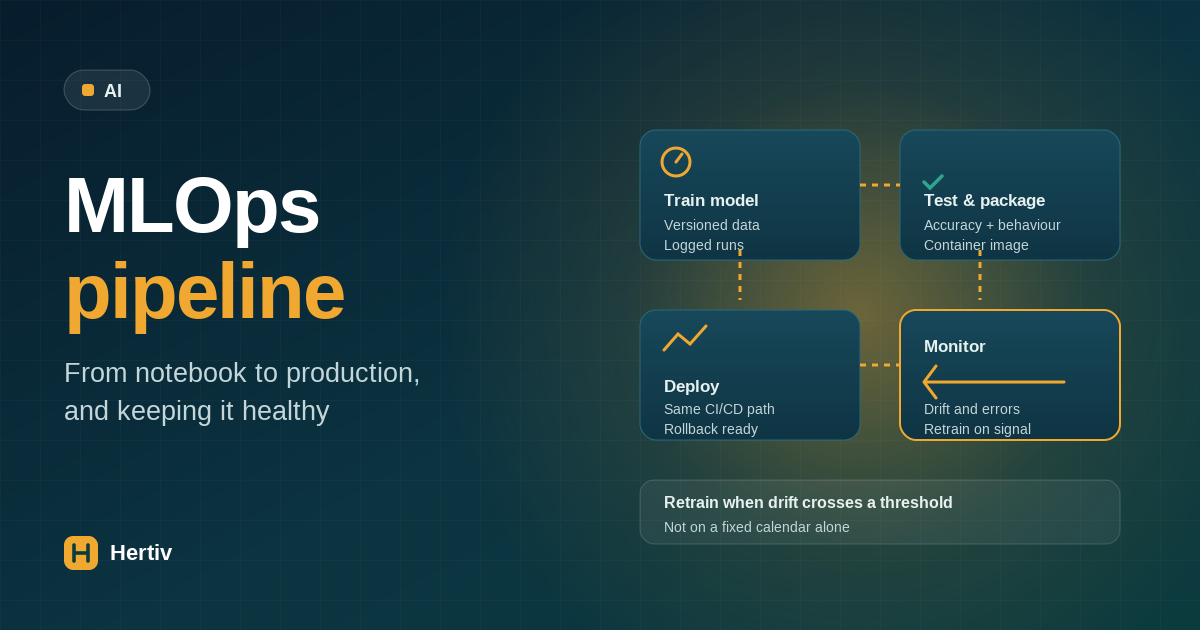
An MLOps pipeline has five stages: data, training, testing, deployment and monitoring. Each stage has a clear input and output, so a failure in one stage does not silently corrupt the next.
| Stage | What happens | What is versioned |
|---|---|---|
| Data | Collect, clean and split data | Dataset version, features |
| Training | Train and tune the model | Code, parameters, weights |
| Testing | Check accuracy and behaviour | Test set, metrics, checks |
| Deployment | Package and ship the model | Container image, config |
| Monitoring | Watch predictions and drift | Logs, drift reports, alerts |
The stage teams skip most often is testing. A model can score well on a test set and still fail in production, for example by giving different answers to the same input, or by breaking when a field it expects is missing. Tests that check behaviour, not just accuracy, catch those failures before users do. For how to design those tests, see how to test AI models.
How do you build an MLOps pipeline?
You build an MLOps pipeline by starting with the smallest version that versions data and deploys a model, then adding automation one stage at a time.
- Version the data. Give each dataset a version and store the training data so any model can be rebuilt from the same inputs.
- Put training in code. Move the training steps out of the notebook into a script that runs the same way every time, with parameters logged.
- Track experiments. Record every run: data version, parameters, metrics and the model file, so the best run can be found and repeated.
- Add model tests. Check accuracy on a held-out set, plus behaviour checks such as handling missing fields and giving stable answers.
- Package the model. Put the model and its serving code in a container image, so the same image runs in staging and in production.
- Automate deployment. Deploy the image through the same CI/CD path the rest of the software uses, with a rollback if the new version fails.
- Monitor predictions. Log inputs, outputs and latency, and alert when the input data drifts or the error rate rises.
Each step is small on its own, and that is the point. A team that tries to build all seven at once usually finishes none of them. One step per week, with the model still shipping, is the pace that works. The deployment step benefits from the same habits as any release, so CI/CD basics apply directly to model delivery.
Which tools do you need for an MLOps pipeline?
The tools you need for an MLOps pipeline are a version control system, an experiment tracker, a model registry, a CI/CD system and a monitoring setup. Most teams already have the first and the fourth, so the new pieces are the tracker, the registry and the monitoring.
An experiment tracker records runs and metrics. A model registry stores approved model versions and marks which one is live, so a rollback is a change of pointer rather than a rebuild. Monitoring can start as simple logging of inputs and outputs, and grow into drift detection when the team has enough production data to compare against.
There is no single standard stack, and the choice matters less than the habit of using it. A team that tracks experiments in a spreadsheet and versions data by hand will still beat a team with the best tools that nobody uses. Pick tools the team will actually run, and add more only when a missing piece causes a real problem.
If the pipeline needs outside help, MLOps consulting usually starts by mapping the current path from notebook to production, then automating the slowest or riskiest step first.
Example (hypothetical): a churn model pipeline
Example (hypothetical): a subscription company has a churn model that a data scientist retrains by hand each month in a notebook. The team wants a pipeline that retrains it weekly and deploys it without manual steps.
The team versions the customer data each week and moves training into a script. The first automated run trains on 20,000 customers and scores 85 out of 100 on the held-out set. The model is packaged into a container and deployed behind an API, with the old version kept for rollback.
Monitoring logs every prediction. After four weeks, the team sees that the input data has drifted: the share of customers on the new pricing plan has risen from 1 in 10 to 4 in 10. The model is retrained on the newer data, and its score rises from 82 to 86 out of 100. The numbers are invented to show the arithmetic, not a real result.
The point is that the pipeline did two things the notebook could not: it retrained on a schedule without anyone remembering, and it showed the drift that told the team the model needed retraining. Both are routine once the pipeline exists, and both are easy to miss without it.
What are the common mistakes?
The most common mistakes with MLOps pipelines are building too much at once, not versioning data, and shipping a model with no monitoring.
- Building everything first. A pipeline that tries to automate all seven stages before the first model ships usually ships nothing.
- No data versioning. A model that cannot be rebuilt from the same data cannot be debugged, audited or rolled back with confidence.
- Testing accuracy only. A model can be accurate and still break on missing fields, so behaviour checks matter as much as metrics.
- No rollback plan. Every deployment should be reversible in minutes, whether that means pointing back to the old model or redeploying it.
- Shipping without monitoring. A model with no logging will drift silently, and the first sign of trouble will be a customer complaint.
These mistakes share one root: the pipeline was treated as a project to finish rather than a habit to keep. A pipeline needs an owner who watches it, fixes it when it breaks, and improves it as the team learns.
How do you know the pipeline is working?
You know an MLOps pipeline is working when a model can be rebuilt, redeployed and rolled back without manual work, and when drift is spotted before users notice it.
Useful signals include time from a new dataset to a deployed model, the share of deploys that need manual fixes, and how quickly a bad model is detected and rolled back. If a retrain takes a week of manual work, the pipeline is not doing its job. If a drift alert arrives before a customer complains, it is.
Review those signals monthly, and fix the slowest or riskiest stage first. A pipeline that improves a little each month will, after a year, be far ahead of one that was built in a single big effort and then left alone. That steady improvement is the real goal, not a perfect first version.
Key takeaways
- An MLOps pipeline versions data, code and model weights, not just code
- Start with data versioning and a deployable model, then add automation stage by stage
- Test model behaviour, not only accuracy, before a model reaches users
- Every deployment needs a rollback, and every model needs monitoring
- Drift detection tells you when to retrain, so the schedule follows the data
Frequently asked questions
What is the difference between MLOps and DevOps?
DevOps covers the delivery of software: code, tests, deployment and monitoring. MLOps adds the machine learning parts: versioning data and model weights, tracking experiments, testing model behaviour, and watching predictions for drift. The practices overlap, but a model needs more than a code pipeline.
Do small teams need an MLOps pipeline?
Yes, in a small form. A team with one model still needs to know which data trained it, which version is live, and whether its predictions have drifted. A small pipeline that versions data and logs predictions covers most of that, without the tooling a large team needs.
What is model drift, and why does it matter?
Drift is when the data a model sees in production changes from the data it was trained on, so its predictions get worse. It matters because a model that was accurate in testing can quietly become wrong in production, and without monitoring nobody notices until users do.
How often should a model be retrained?
As often as the data changes, not on a fixed calendar. Some models need weekly retraining, others last months. Monitoring should decide: retrain when drift or error rates cross a threshold, and keep a schedule as a backstop in case the monitoring misses something.
Can I use my existing CI/CD system for MLOps?
Yes. The build, test and deploy steps for a model fit the same CI/CD path as other software, with extra steps for data versioning, model testing and packaging. Most teams extend the pipeline they already have rather than building a separate one.
What is a model registry?
A model registry is a store for trained model versions, with a record of which data and parameters produced each one and which version is live. It makes rollback a change of pointer instead of a rebuild, and it gives auditors a clear record of what was deployed and when.


