How Much Does It Cost to Make an App?
App costs depend on scope, design, platforms and what happens after launch. Here is how the money breaks down and how to budget for a first version.
On this page
Short answer
The cost of making an app is the total spend to design, build, test and launch it, plus the ongoing cost of running and improving it. There is no single price, because a simple one-screen app and a marketplace with payments, accounts and live data are different products. The honest answer is a range tied to scope, and this article shows how that range is built.
What does the cost of making an app cover?
The cost of making an app covers design, development, testing, launch and the first months of running it. Many first budgets only count the build, then run out of money on the parts that come after it.
Design covers how the app looks and how a person moves through it, from the first screen to the payment step. Development covers the app itself, the server or backend that stores data, and the connections to payment, maps or messaging services. Testing covers checking the app on real phones and fixing what breaks.
Launch covers app store listings, screenshots and the review process. Running costs cover hosting, monitoring, bug fixes and small improvements after launch. A budget that stops at launch will be short within a few months, because every live app needs care.
What drives the cost of an app?
Five things drive most of the cost of an app: how many screens and features it has, how much design work it needs, whether it runs on one platform or two, how many outside services it connects to, and how much testing it needs.
| Driver | Low cost | High cost |
|---|---|---|
| Features | One task, few screens | Accounts, payments, chat, live data |
| Design | Standard screens, simple flow | Custom design, animations, brand work |
| Platforms | iPhone or Android only | Both, plus a web version |
| Integrations | None or one payment service | Maps, messaging, bookings, analytics |
| Data and rules | Static content | Real-time sync, roles, permissions |
| Testing | A few phones, one release | Many devices, accessibility, security |
Cutting a feature is the fastest way to cut cost, because every feature needs design, code, tests and support. A feature that serves a small group of users rarely earns its share of the budget. For the build side, AI app development cost shows how these drivers apply to apps with AI features.
How much do different types of apps cost?
Different types of apps cost different amounts because they carry different amounts of work. A simple content app is mostly screens and text, while a marketplace must handle accounts, payments, disputes and live data at the same time.
| App type | Typical scope | Biggest cost part |
|---|---|---|
| Simple content app | Articles, images, search | Design and content |
| Booking app | Calendar, payments, reminders | Payments and scheduling |
| Marketplace app | Listings, chat, payments, reviews | Trust, payments and disputes |
| Social app | Feeds, follows, media, alerts | Scale and moderation |
| On-demand app | Live tracking, dispatch, payments | Real-time location and dispatch |
These are scopes, not prices, because rates differ by team and region, and vendors price differently, so check the vendor site for current rates. A quote that only gives a total with no breakdown is hard to compare with another quote.
Ask for hours by feature, so you can see which part costs the most and what happens if you cut it. For a smaller first step, how much an MVP costs explains the cheapest version that still tests the idea.
Example (hypothetical): a clinic booking app budget
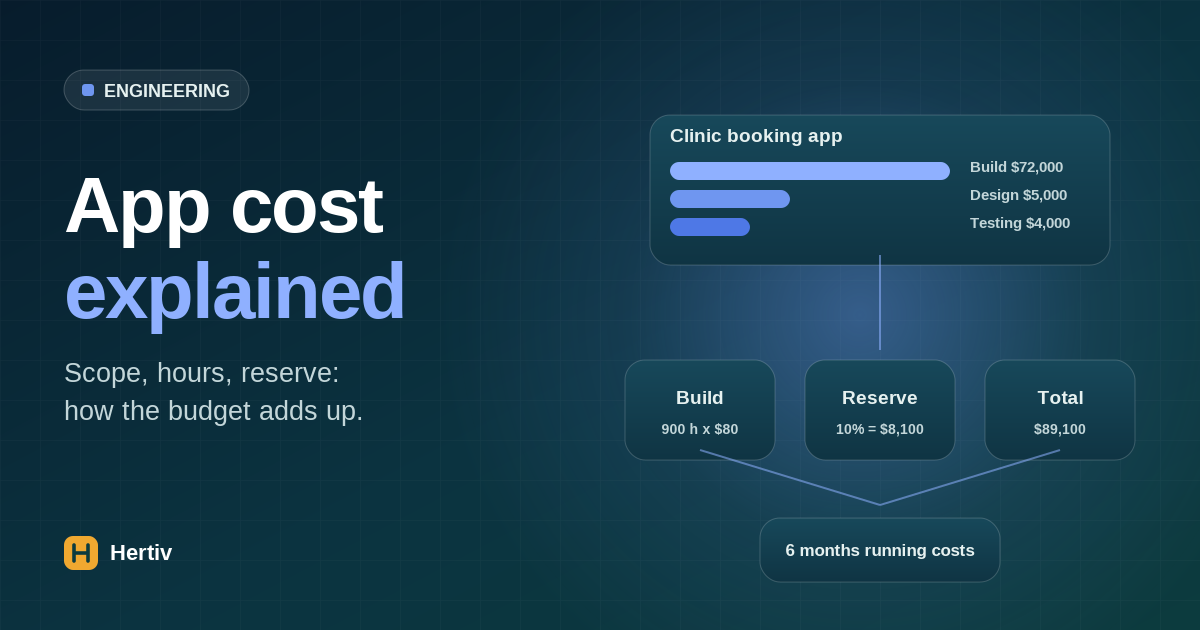
Example (hypothetical): a small clinic wants a booking app for iPhone and Android, with accounts, a calendar, payments and reminders. The team estimates 900 hours of design and development at $80 an hour, which is $72,000.
On top of that, the team budgets $5,000 for design polish and store assets, and $4,000 for testing on real devices and fixing the bugs found. That brings the build to $72,000 + $5,000 + $4,000 = $81,000.
The team then adds a 10% reserve for surprises, which is $8,100, for a total budget of $89,100. The reserve matters: the first version always finds a problem nobody planned for, such as a payment flow that fails on one phone model, and the reserve pays for the fix without a new approval round.
How to budget for your app in 5 steps
You budget for an app by listing the features, estimating the hours for each, adding the costs outside the build, and keeping a reserve for surprises.
- List the features for version one only. Write the smallest set that still solves the problem, and move the rest to a later list.
- Estimate hours per feature. Ask for hours, not just a total, so you can compare quotes and cut the expensive parts first.
- Add design, testing and launch. These are often a quarter of the total, and leaving them out is the most common budget mistake.
- Add running costs for six months. Hosting, store fees, monitoring and bug fixes need a budget from day one.
- Add a 10% reserve. Keep it untouched until a real surprise appears, and do not spend it on extra features.
Revisit the budget at each milestone. If one feature runs over, cut a lower-priority feature rather than raising the total, or the budget will keep growing with every review. For the planning side, how to validate an app idea shows how to test the idea before spending on the build.
What are the common mistakes?
The most common app cost mistakes are budgeting only for the build, adding features during development, and choosing the cheapest quote without reading what it leaves out.
- Forgetting running costs. Hosting, fixes and updates start the day the app launches, and they never stop.
- Adding features mid-build. Each new feature costs design, code, tests and support, and it delays everything else.
- Comparing totals, not breakdowns. A cheap total that leaves out testing and launch will cost more than an honest quote.
- Building for two platforms at once. Two apps double the testing and the fixes; one platform first is often cheaper.
- No reserve. Without a reserve, the first surprise becomes a crisis and a request for more money.
How to keep app costs down after launch
You keep app costs down after launch by fixing what users actually report, retiring features nobody uses, and reviewing the hosting and service bills every month.
Start with the bug list. Fix the crashes and the broken flows first, because they cost users, and leave cosmetic changes for later. Then look at usage: a feature used by a handful of people still costs testing and maintenance on every release, so removing it saves money every month.
Review the bills. Hosting, analytics, messaging and payment services each charge by use, and a plan chosen at launch may no longer fit. A monthly review of ten minutes can find a service you pay for and no longer need. For the ongoing side, iOS app development cost covers the platform-specific costs that keep appearing after launch.
Key takeaways
- App cost is design, build, testing, launch and running costs together
- Features, platforms, integrations and testing drive most of the price
- Cutting a feature is the fastest way to cut cost
- Add design, testing, launch and six months of running costs to every budget
- Keep a 10% reserve for the surprises every first version finds
Frequently asked questions
How much does a simple app cost to make?
It depends on the team and the region, and vendors price differently, so check the vendor site for current rates. A simple app with a few screens and no accounts or payments costs far less than a marketplace with payments, chat and live data, because the work is a fraction of the size.
Is it cheaper to build for iPhone or Android first?
Building for one platform first is usually cheaper, because you pay for one app, one set of tests and one launch. Pick the platform your users actually use, launch there, and add the second platform once the first version proves itself.
Why do app quotes vary so much?
Quotes vary because teams count different things. One quote may leave out design, testing or launch, while another includes them. Ask every vendor for the same feature list and an hour breakdown, so you are comparing the same work.
What are the hidden costs of making an app?
The common hidden costs are app store fees, hosting, payment fees, third-party services, testing devices and post-launch fixes. They are small on their own, but together they add up to a real monthly bill.
How long does it take to make an app?
A simple app can take a few weeks, while a marketplace or on-demand app can take several months. The time depends on the feature list, the design work and how quickly decisions are made, not just on the size of the team.
Can I make an app with no coding?
Yes, no-code tools can build simple apps, but they struggle with custom logic, scale and unusual features. They are a good way to test an idea, and a poor fit for an app that must grow beyond a simple prototype.


