How to Build a Canton Network Wallet: A Practical Guide
A Canton Network wallet is a key pair plus a party on a validator. Here is how the Wallet SDK, the Global Synchronizer and Canton Coin fit together.
On this page
Short answer
A Canton Network wallet is built with the Wallet SDK: you generate a key pair, create an external party on a validator, and hold Canton Coin and tokenized assets through that party. The wallet signs transactions with its private key, the validator submits them to the Global Synchronizer, and Canton Coin pays for the traffic each transaction uses.
What is a Canton Network wallet?
A Canton Network wallet is a key pair and a party identity on a Canton validator, used to hold Canton Coin and tokenized assets and to sign transactions. The wallet does not store coins the way a file stores documents: it stores the private key that controls a party, and the ledger records what that party owns.
Canton Network is a permissioned, privacy-preserving blockchain network built by Digital Asset for regulated financial institutions, using Daml smart contracts. Parties only see the transactions they take part in, which is why a wallet on Canton is tied to an identity rather than to a public address anyone can watch.
Key control works the same way it does elsewhere: whoever holds the private key controls the party, as MPC wallets show for a different key design.
The wallet has two faces. To the user it is an app that shows balances and sends transfers. To the network it is a party on a validator, with a key pair, a traffic budget and a set of contracts it can exercise. Both faces matter: a wallet that looks right but cannot sign, or cannot pay for traffic, does not work.
How does a Canton wallet work?
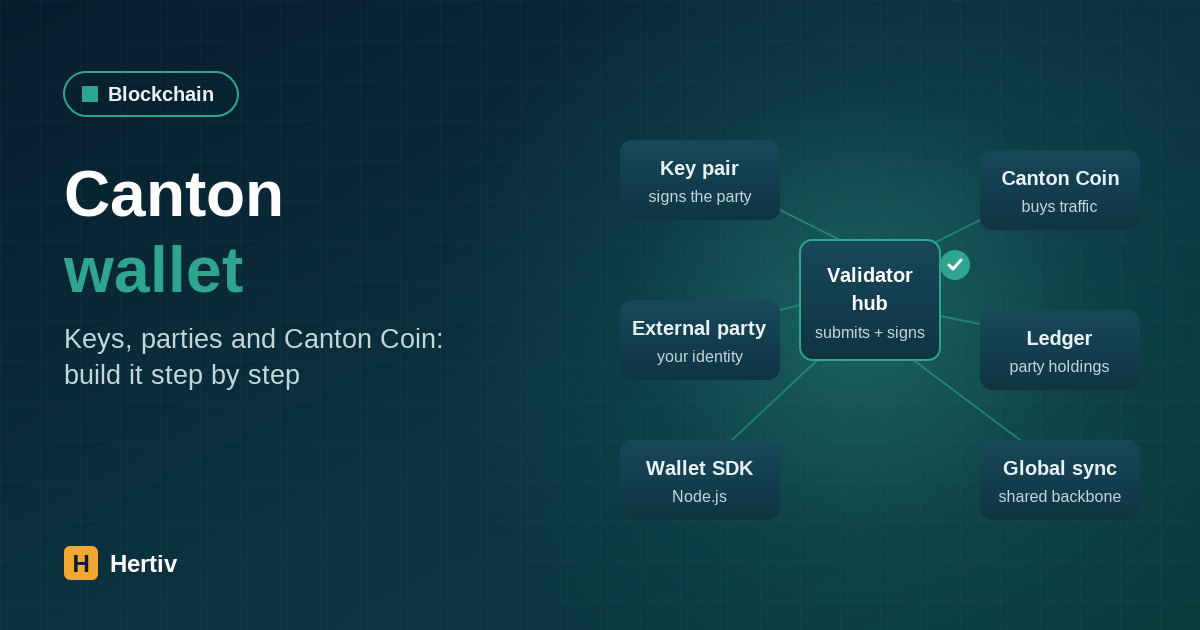
A Canton wallet works through six parts that fit together: the key pair proves who you are, the party is your identity on the ledger, the validator runs your view of the ledger, the Global Synchronizer moves messages between validators, Canton Coin pays for traffic, and the Wallet SDK ties it all together in code.
| Part | What it does | Who controls it |
|---|---|---|
| Key pair | Signs transactions, proves the party | You, the wallet holder |
| Party | Identity on the ledger | Created from your public key |
| Validator | Runs your ledger view, submits transactions | You or a hosting provider |
| Global Synchronizer | Shared backbone that orders messages | Super Validators |
| Canton Coin (CC) | Native token, converted into traffic credits | Held by the party |
| Wallet SDK | Creates parties, signs and submits | Your application code |
An external party is a party controlled by a key pair you hold, rather than one hosted inside a validator. The Wallet SDK creates the party by building topology transactions, signing them with your private key and submitting them.
The party's identity is made from a hint you choose plus the fingerprint of your public key. Because you hold the key, no one else can act as your party, which is the non-custodial side of the choice covered in custodial versus non-custodial wallets.
What do you need before you start?
You need five things before you start building a Canton Network wallet: a Node.js environment, a running Canton validator to connect to, the Wallet SDK package, an auth setup, and a plan for keeping the private key safe.
The Wallet SDK is published as the @canton-network/wallet-sdk package on the npm registry, and it currently supports Node.js environments only. For development, a local validator is the easiest start: Splice LocalNet runs on your own machine and gives you test Canton Coin automatically. DevNet and TestNet provide test coins through a faucet, while MainNet needs real Canton Coin and full onboarding.
Auth depends on the environment. For local development only, the SDK supports self-signed tokens. For a real validator, use OAuth with client credentials, as the docs show. The key plan matters most: the private key is the wallet, so decide where it lives, who can read it and how it is backed up before you create the party. A crypto wallet development plan should cover key storage from the first day, not after launch.
How do you build a Canton Network wallet?
You build a Canton Network wallet by installing the SDK, connecting to a validator, generating a key pair, creating an external party, funding it with test Canton Coin, and sending a first transfer to prove the whole path works.
- Install the SDK. Add the @canton-network/wallet-sdk package to a Node.js project with your package manager.
- Start a validator. Run Splice LocalNet on your machine for development, or point at a DevNet, TestNet or MainNet validator later.
- Set up auth. Use self-signed tokens for local work only, and OAuth client credentials for any real validator.
- Create the SDK. Initialise it with your auth setup, the ledger API URL and the synchronizer id.
- Generate a key pair and create the party. Generate the keys, pick a party hint such as my-wallet-1, and let the SDK create, sign and submit the party's topology transactions.
- Fund it and send a first transfer. Get test Canton Coin from LocalNet or a faucet, check the balance, then send a small transfer to another party and confirm it arrives.
Work through the steps in order on LocalNet first. Each step has one thing that can go wrong, and fixing it locally is far cheaper than debugging it against a shared test network. The basic wallet flow is the same shape as any other crypto wallet build, as how to create a crypto wallet shows.
How do signing and traffic work?
Signing and traffic are the two costs of every Canton transaction: the private key signs it, and Canton Coin pays for the traffic it uses. Both are handled by the wallet and the validator, but the wallet owner is responsible for keeping both topped up.
Signing happens when the SDK submits a transaction: it is signed with the party's private key, which proves the party approved it. When you create an external party, the SDK also signs the party's topology transactions with the same key. External parties sign with keys they control, so a validator cannot act for them, and reward collection needs either a delegation to a validator or custom automation.
Traffic is Canton's name for transaction fees. You do not pay Canton Coin directly when you submit a transaction: your validator keeps a traffic budget measured in traffic credits, and each transaction deducts credits based on its size and complexity.
You top up the budget by converting Canton Coin into credits, and credits are non-transferable once converted. Validators can enable auto-top-up to convert coins automatically when the budget runs low, and if the budget is empty, transactions fail.
Example (hypothetical): a small settlement wallet
Example (hypothetical): a finance team runs a Canton wallet to settle invoices with a counterparty. Over one week the wallet receives 3 payments of 200 Canton Coin, so it holds 600 CC in total.
The team converts 100 CC into traffic credits to keep the validator's budget topped up, leaving 500 CC. It then sends 150 CC to the counterparty as a settlement payment.
The wallet's Canton Coin balance is now 350 CC: 600 received, minus 100 converted to traffic credits, minus 150 sent, equals 350. The traffic credits sit separately in the validator's budget and are spent as transactions are submitted. The team checks the balance after each step, because a wallet that cannot show its balance after a transfer is a wallet with a bug, not a wallet with a rounding error.
What are the common mistakes?
The most common Canton Network wallet mistakes are using local-only auth in production, losing the private key, forgetting the traffic budget, and testing with real coins.
- Self-signed auth outside local work. Self-signed tokens are for local development only; real validators need OAuth.
- No key backup. Losing the private key means losing control of the party and everything it holds.
- Empty traffic budget. Transactions fail when the budget runs out, so watch it and enable auto-top-up.
- Testing on MainNet. Use LocalNet or a faucet on DevNet and TestNet; MainNet coins have real value.
- Treating the party hint as the identity. The hint is a label; the public key fingerprint is the identity.
- Skipping the first transfer. A wallet that has never sent a transfer has never been tested end to end.
Key takeaways
- A Canton wallet is a key pair plus an external party on a validator, not a file of coins.
- The Wallet SDK creates the party by signing topology transactions with your private key.
- Start on Splice LocalNet, where test Canton Coin is automatic, and use a faucet on DevNet and TestNet.
- Self-signed auth is for local development only; real validators need OAuth.
- Canton Coin buys traffic credits, and transactions fail when the traffic budget is empty.
- Back up the private key before creating the party, and test with a small transfer first.
Frequently asked questions
What is a Canton Network wallet?
A Canton Network wallet is a key pair and a party identity on a Canton validator, used to hold Canton Coin and tokenized assets and to sign transactions. The private key controls the party, and the ledger records what that party owns. It is built with the Wallet SDK, a Node.js package from the Canton Network docs.
What is an external party on Canton Network?
An external party is a party controlled by a key pair you hold, rather than one hosted inside a validator. Its identity is made from a hint you choose plus the fingerprint of your public key, and the Wallet SDK creates it by building topology transactions, signing them with your private key and submitting them.
What is Canton Coin used for?
Canton Coin is the native utility token of the Global Synchronizer. It is converted into traffic credits, which pay for the transaction fees of submitting transactions. It also rewards synchronizer operators and application providers, and Super Validators stake it to take part in governance.
How do I get test Canton Coin?
On LocalNet, test Canton Coin is available automatically with no action needed. On DevNet and TestNet, a faucet provides free test coins with no real value. On MainNet, you buy Canton Coin from supported exchanges, earn it through validator operations, or receive it by direct transfer from another party.
Can I build a Canton wallet in the browser?
The Wallet SDK currently supports Node.js environments only. For a browser app, use the smaller dApp SDK, which is built for browser use, and keep key handling on a server or in a secure wallet flow rather than in plain browser code.
What happens if I lose the private key?
Losing the private key means losing control of the party and everything it holds, because only that key can sign transactions as the party. There is no password reset for a key pair, so back the key up in a safe place before you create the party, and test the backup by restoring it.