How to Prevent Prompt Injection in LLM Apps
Prompt injection lets an attacker steer your LLM app with text in documents or user input. Learn the defences that stop it, and the tests that prove they work.
On this page
Short answer
Prompt injection is an attack where text supplied by a user or a third-party source tricks a language model into ignoring its instructions and following the attacker's. You prevent it by treating model instructions and untrusted content as separate things: keep system prompts out of user reach, validate and delimit untrusted input, give the model only the tools and permissions it needs, and check its output before acting on it.
What is prompt injection?
Prompt injection is an attack in which text from an untrusted source tricks a language model into following instructions it was never meant to follow. The model cannot tell the difference between an instruction written by its developer and an instruction pasted in by a user, because both arrive as plain text.
That confusion is the whole problem. A support agent that reads customer emails, a document tool that summarises uploaded files, or a chatbot that browses web pages can all be steered by words hidden in the content they process. The attacker does not need access to your code or your model; they only need to place text where the model will read it.
The result can be a leaked system prompt, a wrong refund, a deleted record, or a message sent on your behalf. The defence starts from one rule: treat everything the model reads from outside as data, never as instructions, and check what the model does before it acts. Teams that build LLM products usually pair this work with broader AI security practices.
How do prompt injection attacks work?
A prompt injection attack works by placing an instruction inside content the model is asked to read, so the model treats it as part of its job. In a direct attack, the user types the instruction themselves, for example asking the chatbot to ignore its rules and reveal its system prompt.
In an indirect attack, the instruction is hidden in a third-party source: a web page the model browses, a document it summarises, an email it triages, or a product review it reads. The user may have no idea the instruction is there, which makes indirect attacks harder to spot and harder to blame on any one person.
The most damaging attacks combine injection with tool access. A model that can send email, run database queries or issue refunds can turn a single injected sentence into a real action. That is why the strongest defences limit what the model can do, not just what it can read.
What kinds of prompt injection should you plan for?
Not every injection looks the same, and each kind needs a different defence. The table below covers the patterns teams meet most often, so you can check whether your own defences cover all of them or only the obvious ones.
| Attack type | Where it hides | What it tries to do | Main defence |
|---|---|---|---|
| Direct instruction | User message | Override rules, reveal system prompt | Fixed system prompt, output checks |
| Indirect injection | Web page, document, email | Steer the model without the user knowing | Delimit untrusted content, filter input |
| Jailbreak persona | Conversation history | Talk the model into a role with no rules | Refusal training, guardrail checks |
| Tool-call hijack | Injected text naming a tool | Trigger email, refund or deletion | Least-privilege tools, approval gates |
| Data exfiltration | Hidden text in a file | Make the model quote private data | Output filtering, scoped data access |
| Multi-turn setup | Several harmless messages | Build context that later turns hostile | Full-conversation review, logging |
Multi-turn attacks deserve attention because each message looks harmless on its own. A defence that only checks one message at a time will miss them, which is why logging the full conversation matters as much as filtering single inputs.
How do you prevent prompt injection?
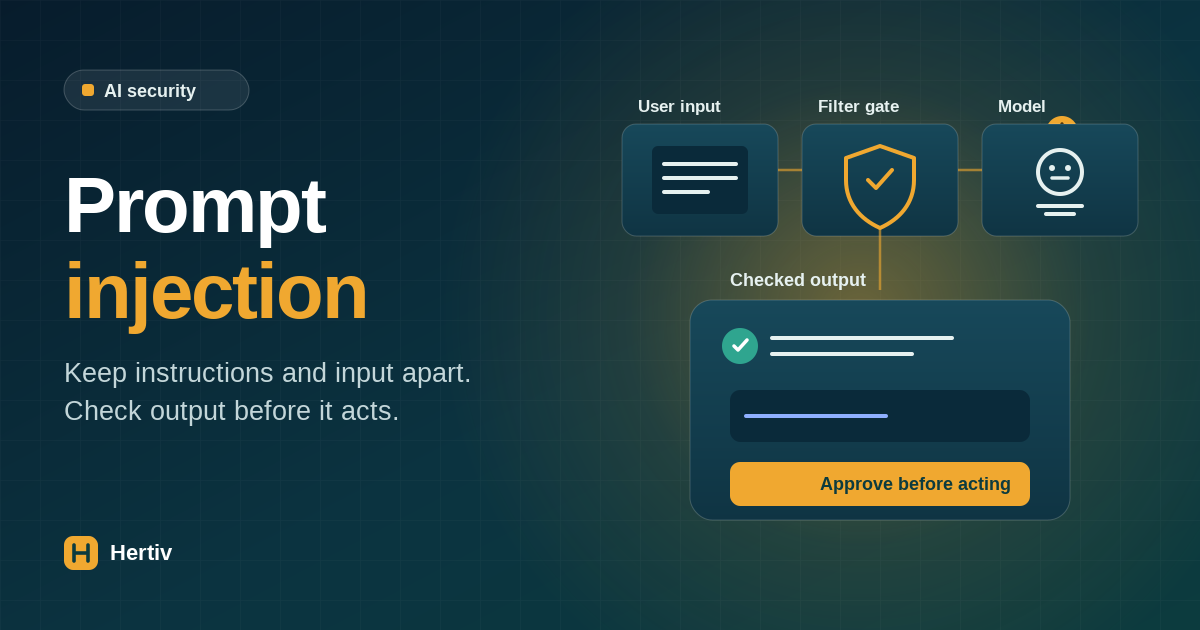
You prevent prompt injection in layers, because no single check catches every attack. Each layer below removes one way in, so an attacker has to beat all of them rather than one.
- Separate instructions from data. Mark untrusted content clearly, for example by wrapping it in delimiters or passing it as a separate structured field, and tell the model to treat it as data to summarise or quote, never as instructions to follow.
- Keep system prompts out of reach. Never let the model repeat its system prompt, and never let user input rewrite it. If the model is asked to reveal its instructions, it should refuse.
- Validate and filter untrusted input. Scan documents, pages and pasted text for instruction-like phrases before they reach the model, and strip or flag anything that reads like a command.
- Give the model least-privilege tools. A support agent that only reads tickets cannot issue a refund, however it is tricked. Scope each tool to the narrowest permission the job needs.
- Check output before acting. Put an approval gate in front of irreversible actions such as refunds, deletions and outbound messages, and validate structured output against a schema before it is used.
- Log everything and watch for patterns. Record prompts, tool calls and outputs, and alert on repeated injection attempts, unusual tool use or sudden changes in behaviour.
These layers work together: separation stops most direct attacks, least privilege limits the damage of the ones that get through, and output checks catch the rest before they reach a customer. For a wider view of the same controls, see how to secure AI agents.
Example (hypothetical): a support agent under attack
Example (hypothetical): a support team runs an agent that reads 500 tickets a day and drafts replies. Of those tickets, 40 contain text pasted in by customers from web pages or documents, which is 8% of the total.
Of the 40 pasted texts, 8 carry an injected instruction telling the agent to issue a refund, which is 20% of the pasted group. Each wrongful refund would cost $60, so 8 refunds would cost 8 times $60, which is $480 a day.
With an approval gate, no refund goes out without a human check. Reviewing 8 flagged tickets takes 8 times 2 minutes, which is 16 minutes a day, and the $480 of wrongful refunds drops to zero. The numbers are invented to show the arithmetic, not a real incident. The point is that a cheap human check on a small flagged set beats an expensive failure on the full set.
What are the common mistakes?
The most common mistakes are trusting the model to sort instructions from data on its own, and giving it tools it does not need.
- Relying on a single warning in the prompt. Telling the model to ignore injected instructions helps a little, but it is the weakest defence and fails against determined attacks.
- Letting the model echo its system prompt. Once the prompt leaks, attackers can design injections around your exact rules.
- Broad tool access. A read-only agent that suddenly gets write access to billing is one injected sentence away from a real loss.
- No output validation. Accepting model output as structured data without checking it against a schema lets a bad value flow straight into your systems.
- Skipping logs. Without full traces you cannot tell whether an odd action was an attack, a bug or a user error, and you cannot improve the defences.
These mistakes share one root: treating the model as a trusted employee instead of an untrusted input processor. Design for the case where the model is tricked, and the damage stays small.
How do you test your defences?
You test your defences by attacking your own system with a fixed set of injection attempts and measuring how many succeed. Build the set from real patterns: direct override requests, hidden instructions in documents, tool-call hijacks and multi-turn setups.
Run the set before launch and again after every change to prompts, tools or guardrails, so a fix in one place does not open a hole in another. Track the share of attempts that reach an irreversible action, and treat any success as a defect to fix, not a curiosity.
Testing should also cover the human side: can reviewers spot a flagged output quickly, and does the approval gate actually stop a bad action? A gate that everyone rubber-stamps is not a gate.
The testing method itself is covered in how to test AI models.
The wider control picture is covered in AI governance.
Key takeaways
- Prompt injection works because the model cannot tell instructions from data on its own
- Indirect attacks hide instructions in web pages, documents and emails the model reads
- Separate instructions from untrusted content, and filter what reaches the model
- Least-privilege tools and approval gates limit what a successful injection can do
- Test with a fixed set of injection attempts before launch and after every change
Frequently asked questions
What is the difference between prompt injection and jailbreaking?
Prompt injection uses untrusted content to make a model follow attacker instructions, often without the user knowing. Jailbreaking is usually a direct attempt by the user to talk the model out of its rules. Both exploit the same weakness, but injection is harder to spot because the attack hides in data the model is asked to read.
Can prompt injection be fully prevented?
No defence is perfect, because models read plain text and attackers keep finding new phrasings. The realistic goal is defence in depth: separation, filtering, least-privilege tools, output checks and logging together make a successful attack rare and its damage small, even if individual attempts get through.
Should the model see the raw document or a cleaned version?
Give it a cleaned version where possible. Strip hidden text, metadata and instruction-like phrases before the document reaches the model, and pass the content as a clearly delimited data field. The less the model has to interpret as instructions, the smaller the attack surface.
Do smaller models resist prompt injection better?
Not reliably. Smaller models may follow injected instructions less cleverly, but they also follow your own instructions less reliably, which creates different failures. Choose the model for the task and the evaluation results, and apply the same layered defences whatever its size.
How do approval gates work for AI agents?
An approval gate pauses the workflow before an irreversible action, such as a refund or a deletion, and asks a human to confirm. The gate should show the proposed action, the source that triggered it and the relevant history, so the reviewer can judge in seconds rather than digging through logs.
What should we log for prompt injection defence?
Log the full prompt, the tool calls, the model output and the human decision for every session, with timestamps. That record lets you spot repeated injection patterns, measure how often defences trigger, and reconstruct any incident. Keep logs long enough to cover the review cycle your team actually follows.


