How to Add ChatGPT to Your App: A Practical Guide
Add ChatGPT to your app by sending user messages to the OpenAI API from your server. Learn the setup, how to keep the key safe, and how to test it.
On this page
Short answer
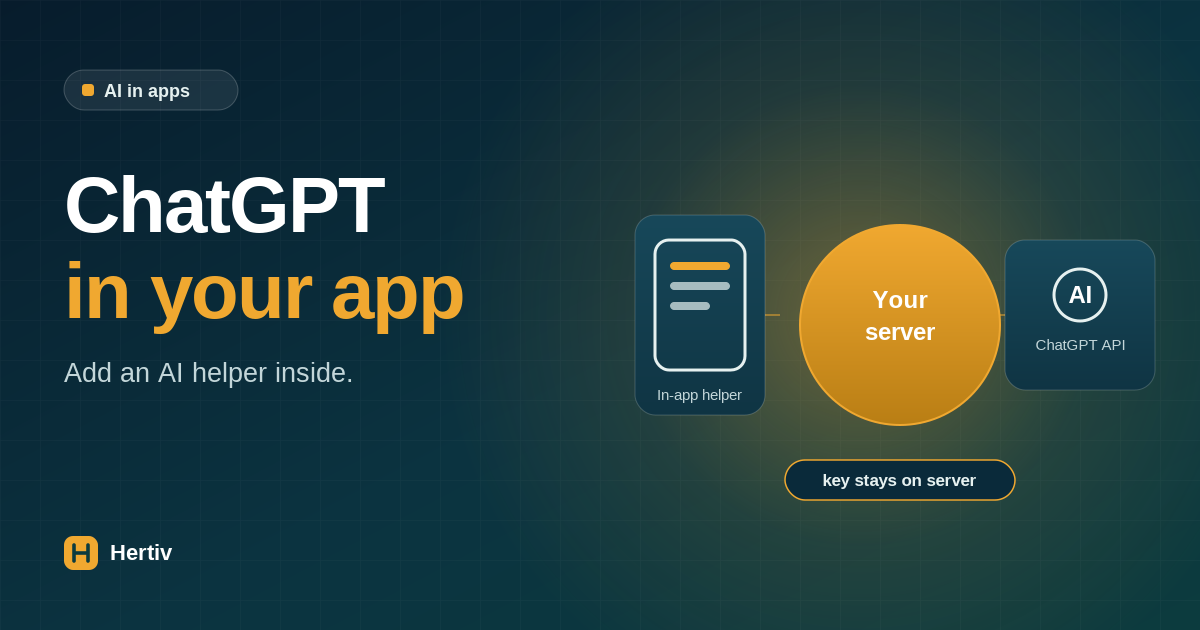
To integrate ChatGPT into your app, send the user's message from your app to your own server, and let the server call the OpenAI API and return the reply. The API key stays on the server, the app shows the reply in its own interface, and your server adds the rules that keep answers safe, on topic and within budget.
What does adding ChatGPT to your app mean?
Adding ChatGPT to your app means giving users an AI helper inside the app itself, rather than sending them to a website or a separate chat tool. The helper can answer questions, draft text, summarise content or guide a user through a task, all without leaving the app.
The app itself does not talk to the model directly. It sends the user's message to your server, your server calls the OpenAI API, and the reply comes back through your server to the app. This matters because the API key must never live inside the app, where anyone could extract it from the installed package.
An in-app helper differs from a website chat box in a few ways. It has to work with the app's own screens, its offline states and its store rules. It also has to fit how people use apps: short sessions, small screens and a low tolerance for slow replies. The table below shows the main ways to connect.
| Way to connect | How it works | Best for |
|---|---|---|
| API through your server | App talks to your server, server calls the API | Most apps, full control over cost and safety |
| Official SDK | Vendor code inside the app handles the calls | Quick prototypes, with care around keys |
| Hosted assistant service | A managed service runs the assistant for you | Teams that want less code to maintain |
Which parts of your app should the helper cover?
Pick one job first, and make it a job people already do in the app. A booking app might help users rewrite a listing description. A learning app might explain a concept in simpler words. A finance app might summarise a statement. One clear job beats a general chat box that tries to do everything.
Check what the helper needs to read before you promise it. A helper that answers questions about a user's own data needs safe access to that data on your server, not inside the app. A helper that only answers general questions needs no user data at all, which is simpler and safer.
Decide what the helper must never do. It should not change money, delete data, or send messages to other people without a clear confirmation step. Write those rules down before you build, because they shape the whole design. Building an AI proof of concept shows how to test one job with a small group before building the full feature.
How to add ChatGPT to your app
Adding ChatGPT to your app follows six steps. The first three are about safety and design, and the last three are about building and testing.
- Define the job and the limits. Write one sentence for what the helper does, and list what it must never do. Keep the list short enough to test.
- Put the API key on your server. Store it as a server secret, and make your server the only thing that calls the API. The app never sees the key.
- Write the system prompt. Tell the model how to behave, what tone to use, and what to say when it does not know. Keep it short and test it.
- Build the server endpoint. The app sends the message and the context it needs; the server checks limits, calls the API and returns the reply.
- Build the in-app screen. Add a chat view or a helper panel that fits the app, with a clear way to stop, retry or report a bad answer.
- Add cost and safety controls. Set a limit per user, log the calls, and block or flag replies that break your rules before they reach the screen.
Most teams build the server endpoint first and test it with a simple web page before touching the app. That way, problems with the prompt or the limits show up early, when they are cheap to fix.
How do you keep answers safe and on topic?
Safety starts with the system prompt, but it cannot end there. A short prompt tells the model its role, the topics it covers, and the exact words to use when it does not know. A model that is told to say "I do not have that information" is far less likely to invent an answer.
Your server should check every reply before it reaches the app. Simple checks catch most problems: block replies that contain links you did not approve, cut off replies that are far too long, and flag replies that mention prices or policies. For sensitive topics, a human review step is worth the delay.
App stores add their own rules. Both major stores ask how an app uses AI, and they expect the app to handle reports of bad content and to avoid presenting AI output as human advice on health, money or law. Read the store rules for AI features before you submit, and build the reporting and disclaimer screens into the app from the start.
Example (hypothetical): an in-app helper for a booking app
Example (hypothetical): a small booking app wants a helper that answers guest questions about a listing, such as check-in times and house rules. The team expects 300 questions a day, and a person takes about 5 minutes to answer each one. That is 300 × 5 minutes = 1,500 minutes, or 25 hours of work a day.
The helper answers from the listing details only. In testing it answers 240 of the 300 questions correctly, and a person reviews the other 60 at about 1 minute each. Review takes 60 × 1 minute = 60 minutes, or 1 hour a day.
The team saves about 25 hours minus 1 hour, which is roughly 24 hours a day of answering work. The saving holds only while the helper stays within the listing details, so the team checks a sample of its replies every week and adds any question it gets wrong to the test set.
How do you test it before release?
Test with the questions real users ask, not with the ones you hope they ask. Collect 100 real questions from support messages and app reviews, and run them through the helper. Count how many answers are correct, how many are wrong, and how many the helper should have refused.
Test on a real device, on a slow connection, and with the app in the background. An in-app helper that works on a fast office network can fail badly on a train, where replies arrive late or the app is killed mid-conversation. Test what happens when the user closes the app and returns later: the conversation should still make sense.
Run a small beta with a few hundred users before a full release. Watch the logs for the questions the helper gets wrong, and fix the system prompt or the data before more people see it. Testing AI models covers how to build a test set that keeps working as the model changes.
What are the common mistakes?
The most common mistake is putting the API key in the app. Anyone can extract a key from an installed app, and a stolen key can run up a large bill in hours. The key belongs on your server, behind your own login and limits.
The second mistake is letting the helper answer anything. A general chat box in a booking app will be asked about the weather, the news and homework. Each off-topic answer costs money and teaches users to treat the helper as a search engine. A clear scope keeps it useful and cheap.
The third mistake is shipping without a way to report bad answers. Users will find the helper's mistakes before you do. A simple report button, and a weekly review of the reports, is the cheapest quality system a team can build.
Key takeaways
- Keep the API key on your server, never in the app
- Pick one clear job for the helper, not a general chat box
- Test with real user questions on a real device
- Check store rules for AI features before you submit
- Give users a way to report bad answers
Frequently asked questions
Can I call the OpenAI API directly from the app?
You can, but you should not. A key inside an app can be extracted from the installed package, and a stolen key can be used to run up a large bill. Send the message to your own server instead, and let the server call the API with the key stored as a secret.
How much does it cost to add ChatGPT to an app?
It depends on how many messages users send and how long the replies are, because the API charges per token. A small beta with a few hundred users usually costs little, but an open chat box can grow fast. Set a per-user limit and watch the bill daily during the beta.
Do I need an SDK, or is the API enough?
The API is enough for most apps. An SDK saves a little setup code, but it does not change the design: you still need a server, a system prompt and safety checks. Choose the SDK only if it fits your platform and your team already knows it.
How do I handle offline use?
Do not promise answers the app cannot give offline. Queue the question and send it when the connection returns, or show a clear message that the helper needs a connection. Never show a cached answer as if it were fresh when the facts may have changed.
Will app stores reject an app with ChatGPT inside?
Not if the app follows the store rules for AI features: say how AI is used, handle reports of bad content, and avoid presenting AI output as human advice on health, money or law. Read the current store guidelines before you submit, because they change.
How do I stop the helper from inventing facts?
Give it only the facts it may use, tell it to say when it does not know, and check replies on your server before they reach the screen. A helper that answers from your listing or product data will invent far less than one asked to answer from general knowledge.


