DevOps vs DevSecOps: What Changes, and What Stays the Same?
DevOps and DevSecOps share the same pipeline, but DevSecOps adds security checks at every step. Compare the two, and see when the extra checks are worth the effort.
On this page
Short answer
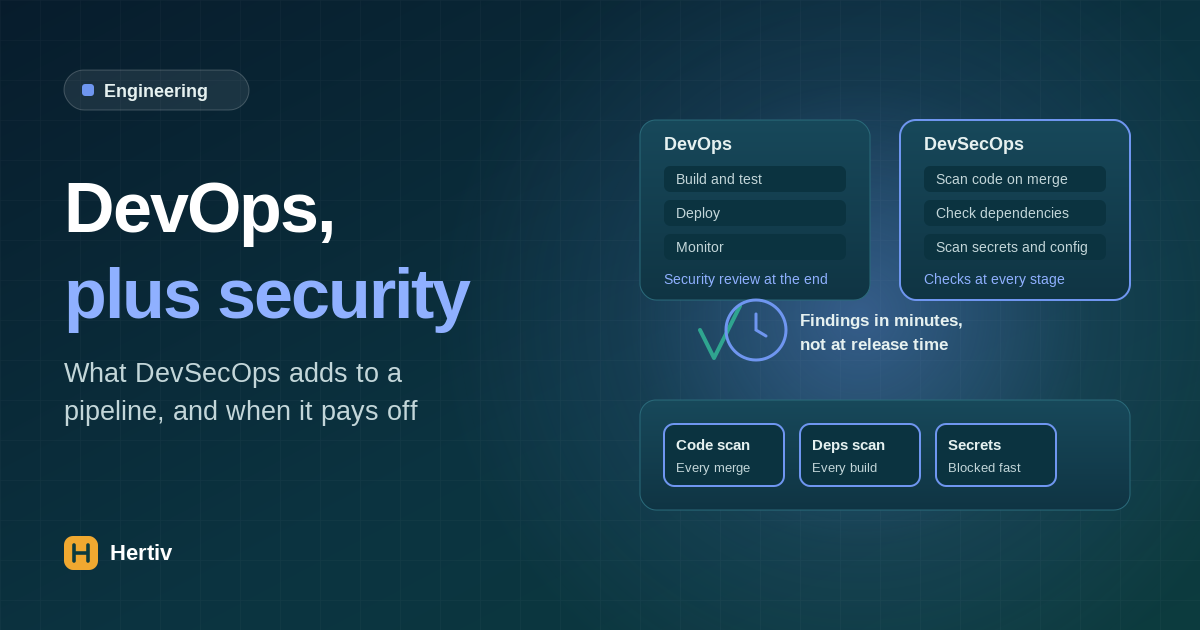
DevSecOps is DevOps with security checks built into every stage of the pipeline, instead of security being a separate review at the end. The pipeline, the automation and the team habits stay the same; what changes is that code, dependencies and infrastructure are checked for security problems as they move through it.
What is the difference between DevOps and DevSecOps?
DevSecOps is DevOps with security treated as part of delivery, not as a gate at the end. In DevOps, a team builds, tests and releases software quickly through an automated pipeline. In DevSecOps, the same pipeline also scans code for known flaws, checks dependencies for vulnerable libraries, and tests the running system for misconfigurations.
The name comes from adding security to the DevOps loop: development, security and operations working on the same pipeline. Nothing about the delivery goal changes. The team still wants small, frequent, safe releases. Security becomes one more automated check, like a unit test, rather than a meeting that happens before a release.
The practical difference is timing. In a DevOps-only team, a security problem is often found late, when fixing it means rework or delay. In a DevSecOps team, the same problem is found by the pipeline within minutes of the change, when the developer still remembers the code. That timing difference is the whole point.
How do DevOps and DevSecOps compare?
DevOps and DevSecOps look the same from the outside: both use version control, automated builds, automated tests and automated deployment. The difference shows up inside the pipeline, in what is checked and who owns the checks.
| Area | DevOps | DevSecOps |
|---|---|---|
| Main goal | Fast, reliable releases | Fast, reliable and secure releases |
| Security checks | Separate review, often late | Automated checks at each stage |
| Who owns security | Security team, at release time | Developers, with security team support |
| Code scanning | Optional, if done at all | On every merge |
| Dependencies | Checked when someone remembers | Scanned for known flaws on each build |
| Secrets | Often in config or code | From a secret store, scanned for leaks |
| Release speed | Fast until the security review | Steady, because checks run in the pipeline |
One row matters more than the rest: who owns security. In DevSecOps, developers fix the findings the pipeline reports, and the security team writes the rules and reviews the exceptions. That split is what keeps the pipeline fast while making security part of daily work.
What does DevOps cover on its own?
DevOps covers the practices that get code from a developer's machine to users quickly and safely: version control, automated builds, automated tests, and deployment that is repeatable and reversible. The team measures lead time, failure rate and recovery time, and improves the pipeline when those numbers get worse.
DevOps also covers the culture around the pipeline: small changes merged often, shared ownership of production, and monitoring that tells the team when a release misbehaves. None of that changes under DevSecOps. A team that has no pipeline discipline gains nothing by adding security scanners, because the scanners will report findings that nobody has time to fix.
For teams still setting up the basics, what DevOps covers is the right starting point. Security checks belong on top of a working pipeline, not instead of one.
What does DevSecOps add to the pipeline?
DevSecOps adds checks at four points in the pipeline. First, static code analysis scans new code for common flaws, such as unsafe input handling, before it is merged. Second, dependency scanning checks the libraries the code uses against lists of known flaws, and flags versions that need updating.
Third, secret scanning looks for passwords, keys and tokens that were accidentally committed, and blocks the merge until they are removed. Fourth, the deployment stage checks infrastructure configuration, such as open storage or unencrypted databases, and runs a dynamic scan against the staging environment.
Each check needs a rule for what happens when it fails. Some findings should block the release, such as a leaked secret or a critical flaw in a dependency. Others should warn and create a ticket, so the pipeline does not grind to a halt over low-risk items. Teams that block on every finding usually end up disabling the checks, which is worse than having none.
How do you add security to a DevOps pipeline?
You add security to a DevOps pipeline one check at a time, starting with the finding that would hurt most if it reached production.
- Scan dependencies first. Vulnerable libraries are the most common finding and the easiest to fix, so start there.
- Add secret scanning. Block merges that contain keys or passwords, and move secrets to a secret store.
- Add code scanning on merge. Start with high-severity rules only, and widen the rules as the team learns to fix them.
- Check infrastructure as code. Scan the configuration that builds environments, so a misconfigured database is caught before it exists.
- Scan the running staging system. A dynamic scan finds problems that only appear when the system runs, such as missing headers.
- Agree the failure rules. Decide which findings block a release and which become tickets, and write it down.
Expect the first weeks to be noisy. Scanners report many findings, and the team needs time to fix the real ones and silence the false ones. That triage work is part of the job, and it is why DevOps services often start with a short assessment before adding tools.
Example (hypothetical): adding checks to a small team's pipeline
Example (hypothetical): a team of six developers releases a web app twice a week. The pipeline builds and tests code in 8 minutes. Security is a manual review that happens once a month, and the last review found a leaked test key and three outdated libraries.
The team adds dependency scanning first. The first run reports 12 outdated libraries, of which 2 have known flaws. Fixing those 2 takes one afternoon, and the pipeline now fails the build when a new flaw appears. Next the team adds secret scanning, which takes one day to set up and blocks one merge in the first week because a test key was committed by mistake.
After a month, the pipeline takes 11 minutes instead of 8, and the team has fixed 9 findings that would previously have waited for the monthly review. The numbers are invented to show the trade-off: a few minutes per build in exchange for findings that arrive while the code is still fresh.
What are the common mistakes?
The most common mistakes with DevSecOps are adding tools before agreeing rules, blocking on every finding, and treating the security team as a separate gate.
- Tools before rules. A scanner without agreed failure rules produces reports nobody acts on.
- Blocking on everything. If every low-risk finding stops a release, developers will find ways around the checks.
- No owner for findings. A finding with no named owner stays open until the next audit.
- Scanning only the code. Dependencies, configuration and secrets cause most real incidents, and code scanning alone misses them.
- Keeping security as a gate. If the security team still reviews releases by hand at the end, the pipeline checks are decoration.
The fix for most of these is the same: start with one check, agree what a failure means, and give the finding to the person who wrote the code. Speed comes from fixing early, not from skipping checks.
Key takeaways
- DevSecOps is DevOps with security checks built into the pipeline, not added at the end
- The pipeline, automation and team habits stay the same; what changes is what gets checked
- Dependency and secret scanning give the fastest payoff and are the best first checks
- Agree which findings block a release and which become tickets, or the checks will be disabled
- Security findings belong to the developer who wrote the code, with the security team setting the rules
Frequently asked questions
Is DevSecOps just DevOps with extra tools?
No. The tools matter less than the change in ownership: developers fix security findings as part of their normal work, and the security team writes the rules and handles exceptions. A team that buys scanners but keeps security as a separate end-of-release review has not adopted DevSecOps.
Do small teams need DevSecOps?
A small team benefits from the cheap checks: dependency scanning and secret scanning take little time to set up and catch the most common problems. Full code scanning and dynamic testing can wait until the team has a working pipeline and someone to own the findings.
Does DevSecOps slow down releases?
It adds minutes to each build, mostly from scanning, but it removes the slow security review at the end. Teams usually find that overall release time falls, because findings arrive while the code is fresh instead of weeks later when fixing them means rework.
Who should own security findings in DevSecOps?
The developer who wrote the code owns the fix, because they know the context and can fix it fastest. The security team owns the rules, the exceptions and the review of high-risk findings. Without that split, findings pile up with no owner.
What is the first security check to add?
Dependency scanning, because vulnerable libraries are common, easy to find and usually easy to fix. Secret scanning is a close second, since a leaked key can be used immediately. Both are cheap to add and give visible results in the first week.
Can DevSecOps work without a dedicated security team?
Yes, for small teams. The pipeline checks do the routine work, and the team follows the rules the tools enforce. What a small team still needs is someone who reviews the exceptions and keeps the rules current, even if that is a part-time role.


