Best AI Optimization Platforms With Data Transparency: 8 to Compare
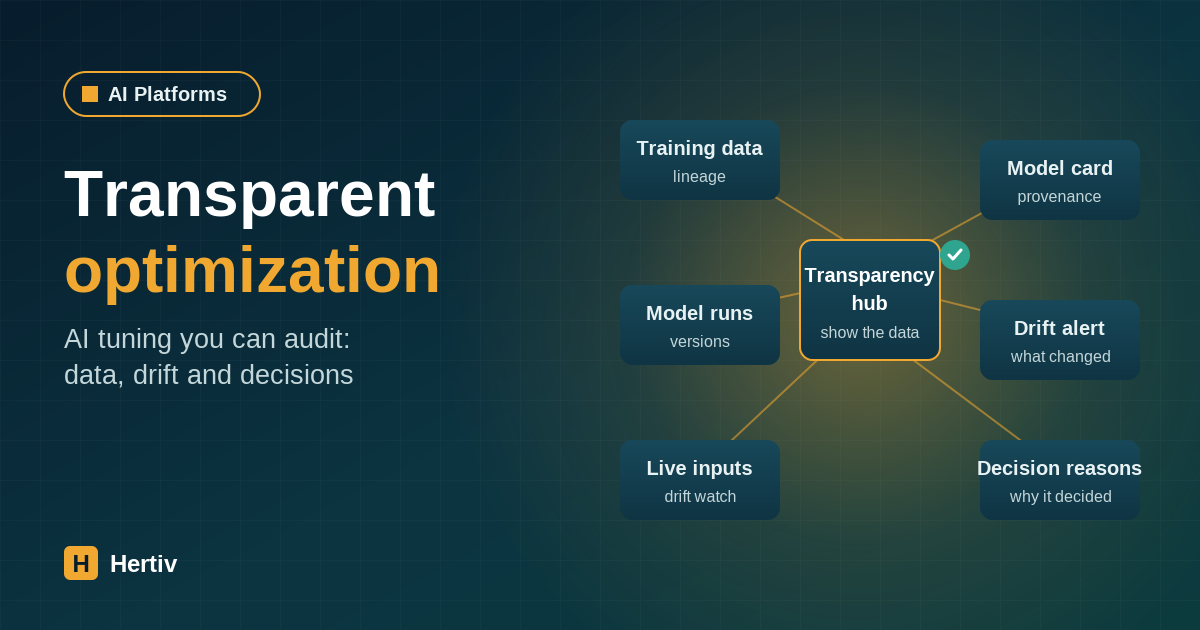
AI optimization platforms show their working: data lineage, model cards, drift alerts and decision reasons, so teams can tune models without losing the data trail.
On this page
Short answer
The best AI optimization platforms with data transparency are the ones that show where training data came from, how it flows through the model, and why the model decided what it did, while also helping teams tune performance. Look for data lineage, drift monitoring, explainability and model cards, and test each platform on your own models before committing.
Which AI optimization platforms show their data work?
The AI optimization platforms worth comparing are the ones that show their working as well as their results: where the training data came from, how it flows through the model, and why the model decided what it did. A platform that tunes a model faster but hides its data leaves you unable to explain a bad decision or fix a drift problem.
Data transparency means the platform records the facts a reviewer needs: which data trained the model, which version ran, and which inputs pushed a decision. The table below compares the eight platforms on what they show and what they tune.
| Platform | What it shows you | What it optimizes | Best for |
|---|---|---|---|
| Arize AI | Drift, data quality, explanations | Live model performance | Teams fixing live models |
| Fiddler AI | Feature impact, decision reasons | Model validation and monitoring | Regulated teams |
| Arthur AI | Model behaviour, guardrail hits | Monitoring and safety checks | Teams shipping LLM apps |
| WhyLabs | Data profiles, drift, quality | Data monitoring at scale | Data-heavy teams |
| TruEra | Diagnostics, quality scores | Model testing and improvement | Quality-first teams |
| Weights & Biases | Experiments, model versions | Training runs and evals | Research teams |
| Evidently AI | Drift and quality reports | Open-source evaluation | Small teams on a budget |
| LangSmith | Prompts, traces, eval scores | LLM app tuning | LLM product teams |
None of these is a black-box tuner. Each one keeps a record you can open, which is what makes the optimization defensible when someone asks why a model changed. For the tracing side, see the LLM observability tools for startups.
Arize AI and Fiddler AI: the monitoring pair
1. Arize AI: best for fixing live models
Arize AI is a machine learning observability platform that watches models in production and shows why they change. It tracks performance, drift and data quality, and links a drop in accuracy back to the inputs that moved, so a team can see whether the model broke or the data did.
Its transparency comes from the trace: every prediction can be tied to the data and model version behind it, and explanations show which features pushed a decision. That suits teams that run models in production and must answer questions about them afterwards.
Pros: strong drift and performance tracking; explanations tied to real predictions; works across model types.
Cons: takes setup time to instrument well; most useful once a model is already live.
2. Fiddler AI: best for regulated teams
Fiddler AI is a model performance management platform built around explainable AI. It monitors models in production, flags drift and bias, and explains individual decisions in terms a reviewer can check, which is why it is often used where decisions affect money, health or credit.
Its transparency is aimed at audits: the platform keeps records of model versions, data and explanations, so a team can show how a decision was reached months later. It suits teams that must defend decisions to a regulator, an auditor or a customer.
Pros: explanations built for audits; bias and drift monitoring; clear model records.
Cons: aimed at larger teams; pricing is by quote, so see vendor site.
Arthur AI and WhyLabs: guardrails and data checks
3. Arthur AI: best for teams shipping LLM apps
Arthur AI is an AI performance platform that monitors models and guards LLM applications. It tracks how models behave in production, tests them against evaluation sets, and runs guardrails that catch unsafe or off-policy outputs before they reach users.
Its transparency shows up in the evaluation record: which prompts were tested, which answers failed, and what the guardrails caught. That record matters for LLM apps, where a single bad output can be hard to explain without a trace of what the model was asked and what it returned.
Pros: monitoring plus guardrails in one place; evaluation sets for LLM apps; clear failure records.
Cons: guardrails need tuning for each use case; smaller teams may use only part of it.
4. WhyLabs: best for data-heavy teams
WhyLabs is a data and AI monitoring platform that watches the data feeding models, not just the models themselves. Its open-source whylogs library logs compact profiles of datasets, and the platform compares those profiles over time to catch drift, missing values and schema changes.
Its transparency is data-first: you can see what changed in the inputs before you blame the model, and the profiles are small enough to share without moving raw data around. That suits teams with large data pipelines where the data, not the model, is usually the thing that moved.
Pros: data-first drift detection; open-source logging; light on raw data movement.
Cons: less focused on model explanations; needs data pipeline access to shine.
TruEra and Weights & Biases: quality and experiments
5. TruEra: best for quality-first teams
TruEra is an AI quality management platform that tests and diagnoses models before and after they ship. It measures model quality, explains individual predictions, and shows which data slices a model handles badly, so teams can fix the weak spots instead of retraining blindly.
Its transparency is diagnostic: the platform shows where a model fails, on which groups of inputs, and what changed between versions. That helps teams that treat model quality as a measured property, not a feeling, and need evidence before a release goes out.
Pros: slice-level diagnostics; quality scores across versions; clear test records.
Cons: aimed at teams with formal testing; less of a live-monitoring tool.
6. Weights & Biases: best for research teams
Weights & Biases is an experiment tracking and model management platform. It records every training run, the data and settings behind it, and the results, so a team can compare runs, reproduce a model, and see which change actually improved it.
Its transparency is the experiment record: model cards, dataset versions and evaluation results are kept together, and the Weave tool adds tracing and evaluation for LLM applications. That suits research and ML teams that run many experiments and need to know which one produced the model in production.
Pros: thorough experiment records; model registry; strong LLM evaluation tooling.
Cons: most value comes with disciplined logging; free tier limits apply, so see vendor site.
Evidently AI and LangSmith: open source and LLM tracing
7. Evidently AI: best for small teams on a budget
Evidently AI is an open-source tool for evaluating and monitoring machine learning models. It reports on data drift, data quality and model performance, and can run as a scheduled check inside your own systems.
Its transparency is practical: the reports are readable by people who did not build the model, and because it is open source, the checks can be read and changed. That suits small teams that want drift and quality reports without paying for a full platform. For the tracing side of LLM work, see how LLM observability works.
Pros: open source and readable reports; drift and quality checks; self-hosted.
Cons: needs engineering time to set up; no managed support on the free version.
8. LangSmith: best for LLM product teams
LangSmith is LangChain's platform for tracing, evaluating and managing LLM applications. It records every prompt, tool call and response, scores outputs against evaluation sets, and keeps prompt versions, so a team can see exactly what its LLM app did and why.
Its transparency is the trace: when a user reports a wrong answer, the trace shows the prompt, retrieved documents, model version and tools called. That suits product teams shipping LLM features, where the failure is usually in the chain around the model rather than in the model itself.
Pros: full traces of LLM apps; evaluation sets and prompt versions; tight fit with LangChain.
Cons: most useful for LangChain-based apps; tracing costs grow with traffic.
How to choose an AI optimization platform
Choose an AI optimization platform by the question you need it to answer, not by the longest feature list. A platform that answers the wrong question is a dashboard, not a tool.
- Name the question. Write down what you must be able to show: data lineage, drift, decision reasons, or all three.
- Check the record. Ask each vendor to show a real trace, report or model card, not a screenshot of a demo.
- Test on your own models. Run one real model through the platform for a week and check whether the explanations match what you know.
- Check the data it needs. Some platforms need raw data; others work on profiles or traces. Pick the one your privacy rules allow.
- Price the whole setup. Count instrumentation time, storage and seats, not just the licence, and see vendor site for current plans.
A platform that cannot show its working on your own data in a week is unlikely to do so later. The methods behind the explanations are covered in what explainable AI is.
What are the common mistakes?
The most common AI optimization platform mistakes are buying a tuner that hides its data, trusting an explanation without checking it, and optimizing before measuring.
- Optimizing before measuring. Tuning a model with no baseline means you cannot tell whether it improved.
- Trusting an explanation as proof. An explanation shows which inputs mattered, not that the decision was right.
- Tracking everything, reviewing nothing. Traces and reports only help if someone reads them on a schedule.
- Ignoring data drift. A model tuned on last month's data can fail on this month's inputs.
- Choosing on benchmarks. Vendor benchmarks rarely match your data or your prompts.
- Keeping personal data in traces. Logs and traces can hold sensitive inputs, so check what is stored and for how long.
Key takeaways
- Data transparency means the platform shows lineage, versions, drift and decision reasons, not just scores.
- Arize AI and Fiddler AI lead on live monitoring and audit-ready explanations.
- Arthur AI and WhyLabs cover guardrails and data-first drift detection.
- TruEra and Weights & Biases keep quality and experiment records worth trusting.
- Evidently AI and LangSmith suit small teams and LLM product teams respectively.
- Test any platform on your own models for a week before committing.
Frequently asked questions
What is data transparency in an AI optimization platform?
Data transparency means the platform records and shows the facts behind a model's behaviour: which data trained it, which version ran, what changed since the last run, and which inputs pushed a decision. Without it, you cannot explain a bad output or prove a fix worked.
How is an optimization platform different from an observability tool?
An observability tool records what a model did, while an optimization platform also helps you improve it: tuning, testing and comparing versions. The best platforms do both, keeping a record of every change so the improvement can be checked and repeated.
Which platform is best for regulated industries?
Fiddler AI and TruEra are the usual shortlist for regulated work, because both keep audit-ready records of model versions, data and explanations. Arthur AI suits teams shipping LLM apps with guardrails. Test each on your own cases, since regulated work varies widely by sector.
Do I need a paid platform, or is open source enough?
Open-source tools such as Evidently AI cover drift and quality reports well, and Arize Phoenix covers tracing. A paid platform adds managed hosting, support and deeper diagnostics. Small teams often start open source and move to a paid platform when the checks become a daily job.
What should I check before buying?
Ask the vendor to show a real trace, report or model card on your own data, not a demo. Check what data the platform stores, how long it keeps it, and what the full setup costs, including instrumentation time. If it cannot show its working in a week, it will not do so later.
Can these platforms work with LLM applications?
Yes. LangSmith is built for LLM apps, with traces, prompt versions and evaluation sets. Arthur AI adds guardrails and evaluation for LLM outputs, and Weights & Biases covers LLM evaluation through its Weave tool. The rest suit traditional models, though several also trace LLM calls.