AI for Content Creation: Drafts Faster, Quality Still Human
AI for content creation drafts text, images and video scripts in minutes, but a person still owns the facts, the voice and the final call.
On this page
Short answer
AI for content creation is the use of generative AI to draft written content, images, audio and video scripts that a person then edits, checks and publishes. It speeds up the first draft; the facts, the voice and the final decision stay with a human editor.
What is AI for content creation?
AI for content creation is software that produces a first version of content, such as a blog draft, a product description, a social post, an image or a video script, from a short brief. A person then edits that draft, checks the facts and publishes it.
It is not a publishing machine. The AI does not know your customers, your product or your brand voice unless you put that into the brief and the examples you give it. What it does well is turn a brief into a structured draft in minutes, including the outline, the headings and the opening lines that usually take the longest.
The honest way to think about it is as a junior drafter with unlimited stamina and no judgement. It will write fast and it will write confidently, including when it is wrong. That is why the editor's job matters more, not less, once AI is in the workflow. See generative AI use cases that work in production for where drafting fits.
What kinds of content can AI draft?
AI can draft most routine content well, and a few kinds badly. The difference is whether the content needs facts only you know, or whether it follows a pattern the AI has seen many times.
| Content type | AI draft quality | Human work left |
|---|---|---|
| Blog first drafts | Good | Facts, voice, examples |
| Product descriptions | Good | Specs, pricing, claims |
| Social posts | Good | Tone, timing, replies |
| Email newsletters | Good | Offers, links, accuracy |
| Video scripts | Fair | Pacing, visuals, facts |
| Images and graphics | Fair | Brand fit, text, rights |
| Technical guides | Weak | Almost everything |
Technical and regulated content is the weak spot. An AI draft of a how-to guide or a compliance note will look finished while containing wrong steps, so the human rewrite is most of the work there. Short, structured content is where the time saving is largest.
How does a good AI content workflow run?
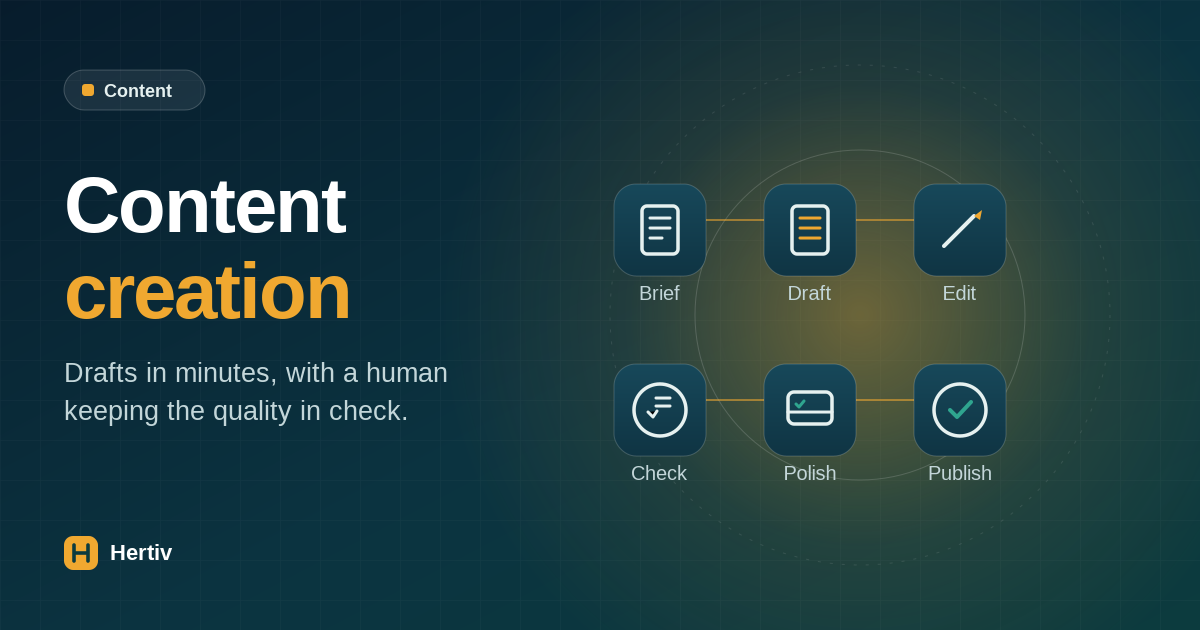
A good AI content workflow runs in five steps: brief, draft, edit, check and publish. Each step has an owner, and the AI only works in the first two.
The brief is the most important step. It states the reader, the one point the piece must make, the facts it must use, the tone, and what it must not claim. A vague brief produces a vague draft, and no amount of editing fixes that cheaply. Good teams keep a short brief template and reuse it.
Drafting is where the AI works: outline, then full draft, then variants of the headline or the opening. Editing is where the human works: cutting what is wrong, adding the examples and facts only the team knows, and making the voice sound like the brand. The check step verifies every fact, link and number. Then the piece is published, and the results are tracked so the next brief gets better.
Where does AI save time, and where does it not?
AI saves time on the blank page, on variants and on reformatting. It does not save time on facts, on judgement or on the final check, and teams that expect it to will be disappointed.
The biggest saving is the first draft. A writer who used to spend two hours on a draft can often get a usable one in under an hour, including the brief. Variants are the second saving: ten headlines, three openings or a short version for social media cost minutes instead of an hour. Reformatting is third: turning one article into a newsletter section or a set of posts is quick work for the AI.
It does not save time on research, on interviewing an expert, or on checking claims. Those steps need a person who knows the subject. It also does not save time when the draft is wrong in ways that are hard to spot, since fixing a confident-sounding wrong draft can take longer than writing from scratch.
How do you keep quality and facts straight?
You keep quality and facts straight by treating every AI draft as unverified until a person has checked it. The check is not optional, and it is not a quick skim.
Run a fact check on every claim that is not common knowledge: names, dates, prices, features and statistics. If a claim cannot be traced to a source your team trusts, cut it. Then check the voice: read the draft out loud and cut anything that sounds like a generic article instead of your brand.
Keep a short style note with the facts that matter: how product names are written, which claims you never make, and the words you avoid. Give that note to the AI with every brief, and keep it updated. For tool choices, the best AI tools for content writing lists the common options to compare.
Finally, track one quality signal, such as the share of drafts that need major edits, or reader feedback. If that signal gets worse as volume rises, the workflow is producing more words and less value, and the brief or the check needs fixing.
How to start using AI for content creation
You start using AI for content creation by picking one content type, writing one brief template, and running a small batch with a human editing every draft. One format done well teaches you more than five formats done badly.
- Pick one format. Choose the content you publish most often, such as blog posts or product descriptions.
- Write a brief template. Reader, one main point, facts to use, tone, and claims to avoid.
- Collect good examples. Three pieces you are proud of, so the AI can see the voice you want.
- Draft a small batch. Four or five pieces, each edited by a person from start to finish.
- Check every fact. Names, dates, prices and features, traced to a source you trust.
- Review and adjust. Note what the AI got right and where it went wrong, then fix the brief, not the draft.
After a month, compare time per piece and the edit rate. If drafting is faster and quality holds, expand to a second format. If quality slipped, tighten the brief and the check before adding volume. Generative AI development can help when the workflow needs to connect to your own content systems.
Example (hypothetical): a weekly blog for a small team
Example (hypothetical): a small team publishes 4 blog posts a month. By hand, each post takes 5 hours: 1 hour of research, 2 hours of drafting, 1 hour of editing and 1 hour of images and checks. That is 20 hours a month.
With AI, each post takes 4 hours: 1 hour of research, 1 hour to brief and draft, 1 hour of editing and 1 hour of checks. That is 16 hours a month, saving 4 hours a month.
Over 12 months, the saving is 48 hours a year, about six working days. The team uses that time for the work AI cannot do: talking to customers, checking facts and writing the examples that make a post worth reading.
What are the common mistakes?
The most common mistakes are publishing drafts unchecked, briefing badly, and judging success by volume instead of quality.
- Publishing unchecked drafts. An AI draft can contain wrong facts that sound right. Every claim needs a source check.
- Thin briefs. A brief that says 'write about our product' produces generic text. Reader, point, facts and tone are the minimum.
- No style note. Without one, the AI drifts toward the same flat voice every other team gets.
- Volume as the metric. More posts only help if readers find them useful. Track time per piece and reader response, not post count.
- AI-written technical claims. Steps, specs and compliance statements must come from a person who knows the subject.
- Skipping the edit. A draft that is only lightly skimmed reads like a draft. Budget real editing time.
Key takeaways
- AI drafts the first version; a person owns the facts, the voice and the final call
- The brief decides the draft: reader, point, facts, tone and claims to avoid
- The biggest saving is the blank page and variants, not research or fact-checking
- Check every claim against a source you trust before publishing
- Judge success by time per piece and reader response, not by post count
Frequently asked questions
Does AI-written content hurt search rankings?
Not by itself. Search engines judge whether content is helpful and accurate, not who typed the first draft. Thin, generic or wrong content performs badly whoever wrote it. A checked, edited AI draft with real examples performs like any good article.
How much time does AI actually save on content?
On routine formats, teams often cut drafting from about two hours to under one hour per piece, including the brief. Research, fact-checking and editing stay the same. The saving is real but smaller than the headlines suggest, and it grows with practice.
Can AI write in our brand voice?
It can get close when you give it good examples and a style note with product names, claims to avoid and tone. Without those, it writes in a generic voice. The editor still needs to read every draft and fix the lines that sound wrong.
What content should AI never write alone?
Technical guides, compliance statements, pricing claims and anything with steps a reader will follow. Those need a person who knows the subject, because a confident-sounding wrong step can cost a reader time or money.
Do we need special tools to start?
No. A general writing tool and a brief template are enough for a first batch. Specialised tools help later, when you want the AI to use your own documents or publish straight into your content system.
How do we stop AI content sounding generic?
Give it specific facts, real examples and your style note with every brief, and edit hard. Cut any sentence that could appear in any company's article. The specific details are what make a piece sound like yours.