AI Cost Savings: Where Businesses Actually Save Money
AI cost savings come from fewer hours on routine work and fewer errors, not from replacing staff. Here is where the savings show up and how to measure them.
On this page
Short answer
AI cost savings are the money a business saves when AI takes over routine work that people used to do by hand: answering repeated questions, sorting documents, drafting first versions and spotting errors early. The savings are real, but they come from hours saved on specific tasks, not from a general promise that AI makes everything cheaper.
What are AI cost savings?
AI cost savings are the lower costs a business achieves when AI handles routine tasks faster and with fewer errors than manual work. A support team that answers the same question a thousand times a month can let AI draft the answers, and the team only checks and sends them. The saving is the time the team gets back.
The savings are not automatic. AI costs money to run, needs someone to check its work, and needs clean data to work from. A business saves money only when the hours saved are worth more than the cost of the tool, the checks and the fixes.
Think of AI as a way to remove repetitive work, not as a way to remove people. The teams that save the most use the freed hours for work that needs judgement: talking to customers, fixing root causes and improving the product.
Where do AI cost savings come from?
AI cost savings come from five places, and each one is easy to measure if you count hours before and after. The table shows where the savings usually appear first.
| Area | What AI does | What is saved |
|---|---|---|
| Customer support | Drafts answers, sorts tickets | Agent hours per ticket |
| Document handling | Reads, sorts and extracts data | Manual data entry hours |
| Content drafting | Writes first drafts and summaries | Drafting and editing hours |
| Error catching | Flags mistakes in forms and code | Rework and fix hours |
| Meeting notes | Transcribes and summarises calls | Note-taking hours |
Support and document handling usually save the most, because the work is repetitive and the volume is high. Content drafting saves less per task, but the volume adds up across a team. For the cost side of starting with AI, see what it costs to implement AI.
How does AI save money in customer support?
AI saves money in customer support by drafting answers and sorting tickets, so agents handle more conversations in the same time and customers wait less.
The usual setup is simple: AI reads the incoming message, suggests a draft answer from the help centre, and the agent checks it before sending. For common questions, the draft is close enough that the agent only edits a line or two. For hard questions, the agent writes the answer from scratch, as before.
The saving is measured in minutes per ticket. If a team handles many tickets a day, even a few minutes saved per ticket adds up to real hours. The risk is a wrong draft going out unchecked, so the team needs a rule: AI drafts, a human sends.
Some teams also let AI answer the simplest questions on its own, such as order status or password resets, and pass the rest to agents. That works only when the answers are safe to automate and the handover to a human is fast when the question is unclear.
How does AI save money on documents and data?
AI saves money on documents and data by reading, sorting and extracting information that people used to type in by hand. Invoices, contracts, forms and reports are the usual targets.
A common use is invoice processing: AI reads each invoice, pulls out the supplier, amount and date, and enters it into the finance system for a person to check. The same pattern works for contracts, where AI finds the key dates and clauses, and for support tickets, where AI sorts them by topic and urgency.
The saving is the data entry time plus the errors avoided. A mistyped invoice number can take hours to trace, so catching it at entry is worth more than the typing time alone. The team still checks the extracted data, but checking a filled form is faster than typing it from scratch.
How do you measure AI cost savings?
You measure AI cost savings by counting hours and costs before and after, on the same task, and subtracting what the AI itself costs to run.
- Pick one task. Choose a task with clear volume, such as answering support tickets or processing invoices.
- Measure the baseline. Count the hours the task takes now and the cost of those hours for two to four weeks.
- Run a pilot. Use AI on the same task for the same period, with a human checking the work.
- Count the new hours. Add the checking time, the fixing time and the tool cost to the new total.
- Compare and decide. If the new total is lower and quality holds, widen the rollout. If not, change the setup or stop.
Keep the measurement honest. Count the time spent checking and fixing AI output, not just the time saved, and include the tool bill. For a fuller method, see how to measure AI ROI.
Example (hypothetical): a support team saving hours
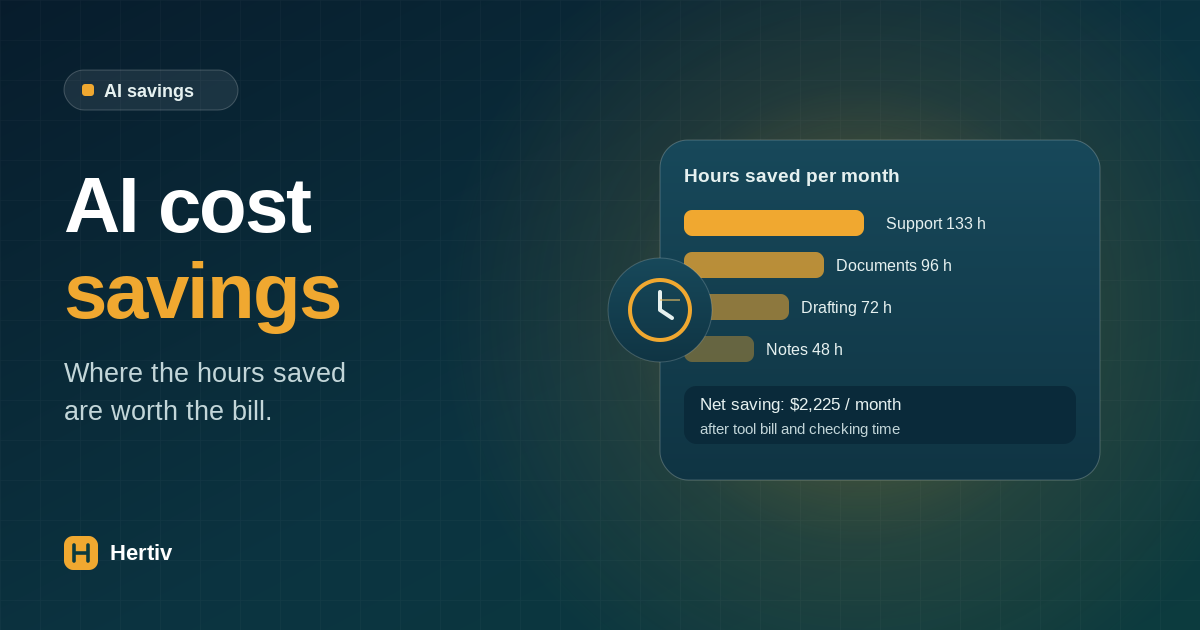
Example (hypothetical): a support team of six agents handles 2,000 tickets a month. Each ticket takes 12 minutes on average, which is 400 hours a month. The team adds an AI drafting tool that suggests answers from the help centre, and agents check each draft before sending.
After a month, the average ticket takes 8 minutes, which is 267 hours a month, a saving of 133 hours. At $25 an hour, that is $3,325 a month saved. The tool costs $600 a month, and checking and fixing drafts adds 20 hours, which is $500. The net saving is $3,325 less $600 less $500, which is $2,225 a month.
The team uses the freed hours to handle the hardest tickets faster and to fix the help centre articles that cause the most questions. The saving grows over time because fewer customers write in about problems the help centre now answers clearly.
What are the common mistakes?
The most common mistakes are counting gross savings instead of net savings, and automating work that needs a human.
- Ignoring the tool bill. AI costs money to run, and the bill grows with usage. Subtract it before claiming a saving.
- Forgetting checking time. Someone must check AI output, and that time is part of the cost.
- Automating the wrong tasks. Angry customers, complaints and complex problems need a human, not a draft.
- No baseline. Without measuring the task before AI, there is no way to know if anything was saved.
- Cutting staff too soon. Savings from freed hours only appear when the hours are used for useful work.
Key takeaways
- AI saves money by removing routine hours, not by removing people
- Support, documents and drafting are where the savings usually appear first
- Count checking time and the tool bill, or the saving is not real
- Measure one task before and after, then decide whether to widen the rollout
- Use freed hours for work that needs judgement, or the saving disappears
Frequently asked questions
Can AI really save a business money?
Yes, when it removes routine hours on a specific task and the tool bill is smaller than the hours saved. Support drafting, document handling and first drafts are the usual places. The saving is real only when you measure hours before and after and subtract the cost of the tool and the checking time.
How much can AI save on customer support?
It depends on ticket volume and how much of each ticket is routine. A team that handles many similar tickets usually saves the most, because AI drafts are close to correct. Measure your own baseline for a few weeks, run a pilot, and compare the hours before claiming a number.
What is the biggest hidden cost of AI?
The biggest hidden cost is usually the human checking time: reading AI drafts, fixing mistakes and handling the cases AI gets wrong. The second is the tool bill, which grows with usage. Both must be counted, or the saving looks larger than it is.
Should AI replace support agents?
No. AI works best as a drafting and sorting helper, with agents checking and sending. Customers with complaints, complex problems or unusual requests need a human. Teams that remove agents and leave AI alone usually see quality fall and customers leave.
How long does it take to see AI cost savings?
A small pilot on one task usually shows a result in four to eight weeks, which is enough time to measure a baseline and compare it with the pilot. Wider savings take longer, because the team needs to change workflows and fix the help centre content that causes repeat questions.
Is AI cheaper than hiring more staff?
Not always. AI is cheaper when the work is repetitive and high volume, because one tool can help a whole team. For work that needs judgement, relationships or creative thinking, hiring is usually the better spend. Compare the two on the same task before deciding.


