What Is Function Calling, and How Does It Work?
Function calling lets a language model ask your code to run a real action, such as looking up an order. Here is how it works and when to use it.
On this page
Short answer
Function calling is a way for a language model to request a specific action from your code by returning a structured call, such as get_order_status with an order number, instead of only writing text. Your code runs that function, sends the result back to the model, and the model then writes the final answer using the real data.
What is function calling?
Function calling is a way for a language model to request a specific action from your code by returning a structured call, such as get_order_status with an order number, instead of only writing text. You describe each function to the model in advance: its name, what it does, and which inputs it needs.
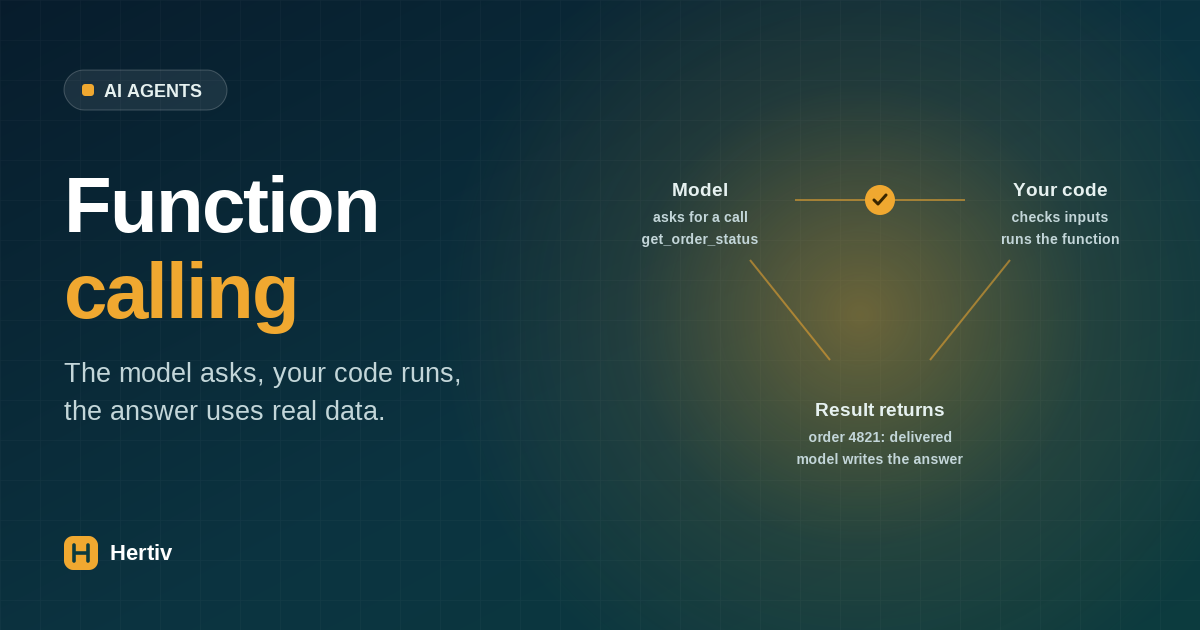
When a user asks a question that needs real data, the model picks the matching function and fills in the inputs. Your code receives that call, runs the function against your own systems, and sends the result back. The model then writes the final answer using the returned data.
Function calling matters because language models cannot see your databases, calendars or order systems on their own. Without it, a model can only guess at facts it does not have. With it, the model becomes the front end of tools you already trust, while your code stays in charge of what actually happens.
How does function calling work?
Function calling works in a short loop between the model, your code and your systems. The model never runs your functions itself. It only suggests a call, and your code decides whether to run it.
- Describe the functions. You give the model a list of functions with names, descriptions and input fields.
- The user asks a question. The model reads the request and decides whether a function would help.
- The model returns a call. It replies with a structured call, such as a function name plus the inputs it chose.
- Your code runs the function. It checks the inputs, calls your system, and collects the result.
- The result goes back to the model. The model writes the final answer using the real result.
If the model is unsure which function fits, or the inputs are missing, it should ask the user a follow-up question instead of guessing. That check is part of your code too, because you control what runs and what does not.
What does a function definition look like?
A function definition is a short description the model can read. It names the function, explains when to use it, and lists each input with its type and whether it is required. Clear descriptions matter, because the model chooses functions from these words alone.
| Field | What it says | Example |
|---|---|---|
| Name | The exact function to call | get_order_status |
| Description | When to use this function | Look up a delivery by order number |
| Parameters | The inputs it needs, with types | order_id as a text string |
| Required | Which inputs must be present | order_id is required |
Keep descriptions plain and specific. A vague description such as "helps with orders" makes the model guess. A clear one such as "returns the delivery status for one order number" lets the model pick correctly and fill in the right input.
Function calling vs plain text answers
A model that only writes text can explain, summarise and draft, but it cannot check a live fact. Function calling adds the missing step: the model can ask for real data before it answers, so the answer is grounded in your systems.
| Approach | What the user gets | Risk |
|---|---|---|
| Plain text answer | A fluent reply written from training | Stale or invented facts |
| Function calling | An answer built on live data | A wrong call if the description is unclear |
| Hard-coded button | One fixed action, no language needed | Cannot handle new questions |
Function calling sits between the two. It keeps the flexibility of language, because the user can ask in their own words, and adds the reliability of a real lookup, because the data comes from your systems. If you want to build this kind of assistant, AI agent development covers the wider pattern of models that plan and act.
When should you use function calling?
Use function calling when the answer depends on data that changes, such as order status, account balances, stock levels or calendar availability. If the fact can change after the model was trained, the model should fetch it rather than recall it.
It also fits tasks where the user wants an action done, not just an explanation. Booking a slot, cancelling an order or updating a record are all actions your code can perform once the model has worked out what the user wants.
Do not use it for questions the model can answer from the text in front of it. Summarising a document or explaining a concept needs no function call. Adding one only slows the reply and adds a place where things can go wrong.
- Good fit: live lookups, bookings, updates and calculations on your own data.
- Poor fit: general explanations, writing drafts and questions with no live data.
- Needs care: actions that move money or change records, which need checks and limits.
How to add function calling in five steps
Adding function calling is a small project, not a rewrite. Most of the work is deciding which functions to expose and how to check their inputs.
- List the actions users ask for. Pick the three to five most common requests that need live data.
- Write one function per action. Keep each function narrow, with a clear name and description.
- Check inputs before running. Confirm the inputs are present and valid, and refuse anything that looks wrong.
- Return short, clear results. Send back only the fields the model needs to answer.
- Test with real questions. Try the questions users actually ask, and fix the descriptions the model gets wrong.
Start with read-only functions, such as lookups, before you add actions that change data. A lookup that fails is a wrong answer; a write that fails can be a real problem. A short proof of concept is the usual way to test the idea first, and how to build an AI proof of concept explains that process.
Example (hypothetical): a support ticket triage
Example (hypothetical): a support team receives 200 tickets a day. A person takes about 5 minutes to read and route each one, which is 200 x 5 = 1,000 minutes, or about 17 hours of work a day.
With function calling, the model reads each ticket and calls a routing function with the category and priority it found. It routes 160 tickets on its own, and 40 unclear tickets go to a person for review at 3 minutes each, which is 40 x 3 = 120 minutes, or 2 hours a day.
The team saves about 15 hours a day, and the model never touches a ticket it is unsure about. The saving comes from the routing function doing the routine work, not from the model being cleverer. The team still checks the unclear cases, which is where mistakes used to happen.
Common mistakes
The most common mistake is giving the model too many functions at once. With thirty overlapping functions, the model picks the wrong one. Start with a few, and add more only when users ask for actions you do not yet support.
Another mistake is trusting the model's inputs without checking them. A model can invent an order number or pass a date in the wrong format. Your code should check every input before it runs anything, and return a clear error if something is missing.
Teams also forget to limit what a function can do. A lookup function should only read, and a write function should only change what the user asked for. Keep the functions narrow, and the model cannot cause more damage than the function allows.
- Too many functions: overlapping choices confuse the model.
- No input checks: invented or wrong inputs reach your systems.
- Over-wide functions: one function that can do everything is hard to control.
Key takeaways
- Function calling lets a model request actions from your code instead of only writing text.
- Your code runs the function and returns the result, so the answer rests on live data.
- Clear function descriptions are what make the model pick the right call.
- Start with read-only lookups, check every input, and keep each function narrow.
- Use function calling when the answer needs data that changes, not for general explanations.
Frequently asked questions
What is function calling in simple terms?
Function calling is a way for a language model to ask your code to run a named action, such as looking up an order, by returning a structured call with the inputs filled in. Your code runs the function, sends the result back, and the model writes the final answer from that real data.
Does the model run my code directly?
No. The model only suggests a call, such as a function name plus inputs, and your code decides whether to run it. This matters because you keep control over what happens, you can check the inputs first, and you can refuse any call that looks wrong or unsafe.
How is function calling different from an API call?
An API call is your code asking another system for data. Function calling is the step before that: the model decides which of your functions to use and what inputs to pass. Your code then makes the API call or database lookup, and hands the result back to the model.
Can function calling change data, not just read it?
Yes, but start with read-only functions such as lookups. Write actions, like cancelling an order or updating a record, need input checks, limits and a way to undo mistakes. Many teams add those only after the read-only version works well in practice.
What happens if the model picks the wrong function?
Your code should check the inputs and refuse calls that do not make sense. Clear function descriptions reduce the chance of a wrong pick, and testing with real user questions shows which descriptions the model misunderstands so you can rewrite them.
Do I need function calling for a chatbot?
Not always. A chatbot that answers from documents can work with retrieval alone, fetching passages before it writes. Function calling becomes useful when the answer needs live data from your own systems, such as an order status, an account balance or a booking slot.


