What Is a Data Lakehouse, and When Does It Fit?
A data lakehouse stores raw data cheaply like a lake and queries it reliably like a warehouse. Learn how it works and when it beats either option alone.
On this page
Short answer
A data lakehouse is a data architecture that stores data in cheap, open file formats like a data lake while adding the reliability features of a data warehouse, such as transactions, schema enforcement and versioning. It lets teams keep one copy of the data and query it with SQL, machine learning and streaming tools without moving it between systems.
What is a data lakehouse?
A data lakehouse is a data platform that combines the low cost and flexibility of a data lake with the reliability of a data warehouse. Data is stored in open file formats on cheap object storage, and a table format layer on top adds transactions, schema checks and version history.
That combination matters because the two older options each had a gap. Data lakes were cheap and could hold any data, but they had no guarantees: files could be half-written, schemas drifted, and the same query could return different results. Data warehouses were reliable and fast for SQL, but they charged for storage and compute together and could not easily hold unstructured data.
The lakehouse answers that by keeping the lake's storage and adding warehouse behaviour on top. One copy of the data serves reporting, ad-hoc analysis and machine learning, instead of three copies in three systems that drift apart. Teams that need both cheap storage and trustworthy queries usually start here, and data engineering work often centres on this pattern.
Data lakehouse vs data warehouse vs data lake
The lakehouse is best understood against the two architectures it combines, because each one still fits some teams better than the others.
| Aspect | Data lake | Data warehouse | Data lakehouse |
|---|---|---|---|
| Storage | Cheap object storage, any format | Proprietary, storage and compute together | Cheap object storage, open formats |
| Data types | Any: files, images, logs, tables | Structured tables mainly | Any, with tables on top |
| Reliability | Weak: no transactions or versioning | Strong: transactions, schema, quality checks | Strong: transactions, schema, versioning |
| Query tools | Engines bolted on later | SQL built in | SQL, machine learning and streaming |
| Cost profile | Low storage, variable compute | High, tied to the vendor | Low storage, pay for the compute you use |
| Best for | Cheap raw storage and exploration | Reporting on clean, structured data | One platform for reporting and machine learning |
The warehouse still wins for a team that only needs reporting on clean tables and wants a managed service with no platform work. The lake still wins for a team that only needs cheap raw storage. The lakehouse wins when one team needs both, and when data scientists and analysts should work on the same data.
How does a lakehouse work?
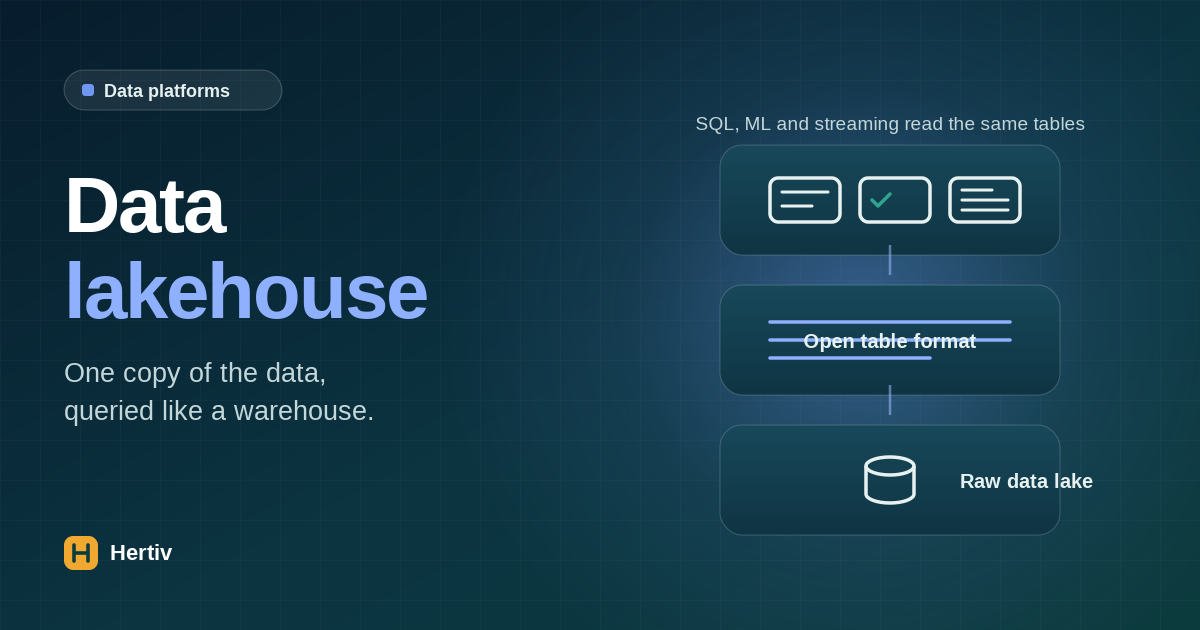
A lakehouse works in three layers: cheap storage at the bottom, an open table format in the middle, and query engines on top, with governance applied across all three.
The storage layer is object storage, which holds files in open formats such as Parquet. Because storage and compute are separate, you pay for storage once and add compute only when queries run. The table format layer, using formats such as Delta Lake, Apache Iceberg or Apache Hudi, records which files belong to which table version, so readers see a consistent snapshot even while writers are adding data.
On top sit the engines: SQL engines for reporting, streaming engines for near-real-time data, and machine learning tools that read the same files directly. Governance, meaning access control, data quality checks and lineage, is applied at the table layer so it holds no matter which engine reads the data.
Data usually flows through zones: raw data lands as it arrives, a cleaned layer applies validation and standardisation, and a curated layer holds the tables that reports and models actually use. Keeping those zones explicit is what stops a lakehouse from degrading into a swamp of untrusted files.
When does a lakehouse fit, and when does it not?
A lakehouse fits when you need one platform for reporting and machine learning, when your data is varied, and when you want to control costs by separating storage from compute.
It fits well for teams that collect clickstreams, logs, sensor data and transactions together, and for teams whose analysts and data scientists currently wait on each other because they work in different systems. It also fits teams that need to keep years of raw data for compliance or for retraining models, since object storage makes that affordable.
It fits less well for a small team with one reporting database and no machine learning work, where a warehouse is simpler and faster to run. It also fits less well if you have no one to operate the platform: a lakehouse needs ownership of table formats, partitioning and quality checks, and without that it drifts. If your data volume is small and your queries are simple, the extra moving parts buy you little.
Example: a retailer moves reporting and models onto one platform
Example (hypothetical): a retailer with 40 stores keeps 30 terabytes of raw clickstream and point-of-sale data, plus 8 terabytes of cleaned sales tables. That is 38 terabytes in total, stored in one lakehouse instead of a warehouse and a separate lake.
Its 12 analysts each run about 5 ad-hoc queries a day, 20 working days a month, which is 1,200 queries a month. Those queries run against the curated layer, while the data science team trains a demand model on the same raw and cleaned files without asking for a copy.
When a bad file lands, the table format lets the team roll back to the previous version instead of rebuilding the table. When the finance team asks where a number came from, lineage at the table layer shows which source files fed the report. The platform costs less than the old warehouse because storage is cheap and compute runs only when queries run, and the team stops maintaining two copies of the same data.
What are the common mistakes?
The most common lakehouse mistakes are skipping the curated layer, letting schemas drift, and choosing a table format before understanding what your engines support.
- No curated layer. Letting every query read raw files means every analyst reinvents the same cleaning, and results disagree.
- Schema drift ignored. Source systems change fields without warning, and without checks the breakage surfaces in a report, not in the pipeline.
- Wrong table format choice. Picking a format your SQL engine or streaming tool does not support well creates workarounds that defeat the point.
- Over-partitioning. Splitting data into thousands of tiny files slows queries and raises costs instead of lowering them.
- No ownership. A lakehouse without a named owner for quality, access and cost becomes a dumping ground within a year.
- Treating it as a warehouse migration. Copying warehouse habits, such as loading everything into one tool, misses the point of open formats and separate compute.
How to start with a lakehouse
You start with a lakehouse by picking one real workload, defining its curated tables, and proving the pattern before migrating anything else.
- Pick one workload. Choose a report or model that currently needs data from two systems, so the benefit is visible.
- Choose the table format. Pick the format your existing SQL and streaming engines support best, and standardise on it.
- Define the curated tables. Agree the schema, the quality checks and the owner for each table before loading data.
- Build the pipeline. Land raw data, clean it into the curated layer, and run the report or model from there.
- Add governance early. Set access control and lineage from the start, because adding them later is far harder.
Measure the result on the workload you chose: query time, cost per month and how often numbers disagree. If those improve, expand to the next workload. Cloud services can host the storage and compute.
Predictive analytics work benefits directly from having models and reports read the same tables.
Key takeaways
- A lakehouse stores data in cheap open formats and adds warehouse reliability on top
- One copy of the data can serve reporting, analysis and machine learning
- The curated layer is what keeps results consistent; raw files alone are not enough
- Pick the table format your engines support, and standardise on it
- Start with one workload and prove the pattern before migrating more
Frequently asked questions
Is a data lakehouse the same as a data lake?
No. A lake stores files cheaply with few guarantees, while a lakehouse adds a table format layer that brings transactions, schema checks and versioning. The lakehouse keeps the lake's cheap storage but makes the data reliable enough for reporting and machine learning.
How is a lakehouse different from a data warehouse?
A warehouse stores data in a proprietary format with storage and compute bundled together. A lakehouse stores data in open formats on cheap object storage and separates compute, so you can use several engines on the same data and avoid being tied to one vendor.
What table formats do lakehouses use?
The common open table formats are Delta Lake, Apache Iceberg and Apache Hudi. They record which files belong to each table version, which gives readers a consistent snapshot and lets you roll back after a bad write.
Does a lakehouse replace our data warehouse?
It can, but it does not have to. Many teams run a lakehouse for varied data and machine learning while keeping a warehouse for a small set of clean reporting tables. Replace the warehouse only when the lakehouse serves its workloads as well or better.
How much data do we need before a lakehouse makes sense?
There is no fixed threshold, but the benefit grows with variety and volume. If you hold logs, clickstreams and transactions together, or you need years of raw data for retraining models, a lakehouse usually pays off. Small, purely tabular reporting often fits a warehouse better.
Who should own a lakehouse?
One named team or person should own table formats, quality checks, access and cost. Without an owner, schemas drift, quality checks lapse and the platform degrades into a collection of untrusted files that nobody wants to query.


