What Does Remote Patient Monitoring Software Cost to Build?
Remote patient monitoring software costs depend on device integrations, data pipelines, alerting and compliance. A first version needs a small team for months.
On this page
Short answer
Remote patient monitoring software typically costs the most in device integrations, secure data pipelines, alerting rules and compliance work, not in the dashboard itself. A first version with a few device types, patient onboarding and clinician alerts usually takes a small team several months. The final figure depends on how many devices you support and which health data rules apply in your market.
What is remote patient monitoring software?
Remote patient monitoring software collects health readings from patients at home, such as blood pressure, glucose or weight, and flags the readings that need a clinician's attention.
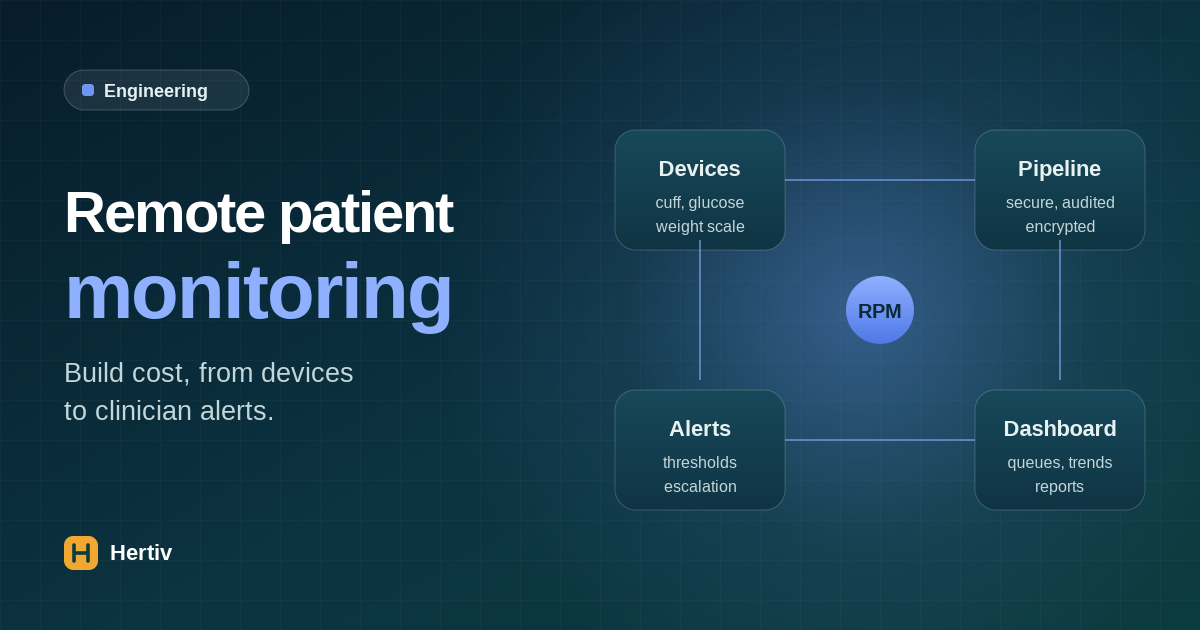
The software has four parts: devices that take readings, a pipeline that moves the data securely, rules that spot readings outside safe ranges, and a dashboard where care teams review alerts and trends. Patients usually see a simple app for pairing devices and viewing their own readings.
The cost of building it comes mostly from the parts users never see: device integrations, data handling and compliance. The dashboard itself is usually the smallest part of the build. For the product side, remote patient monitoring software explains what a finished platform does and how to pick one.
What drives the cost?
Cost is driven by how many devices you support, how strict the data rules are, and how much of the alerting and reporting must be automated.
| Cost driver | What it includes | Effect on cost |
|---|---|---|
| Device integrations | Bluetooth, cellular and manual entry | High, each device type adds work |
| Data pipeline | Ingestion, storage, audit logs | High, must be reliable and secure |
| Alerting rules | Thresholds, escalation, notifications | Medium, clinical input needed |
| Compliance | HIPAA, GDPR, local health rules | High, varies by market |
| Patient app | Pairing, readings, reminders | Medium, must be simple to use |
| Clinician dashboard | Queues, trends, reports | Medium, grows with workflows |
Device integrations are usually the biggest surprise. Each device brand has its own pairing flow, data format and failure modes, so supporting five device types costs far more than supporting one.
Compliance is the second driver. Health data rules decide where data lives, who can see it and how long it is kept, and those decisions shape the whole architecture.
What does a first version include?
A first version should include one or two device types, patient onboarding, alerting on a few vital signs, and a clinician dashboard. Everything else can wait.
A sensible first-version scope:
- Device pairing. Bluetooth pairing for one blood pressure cuff and one glucose meter, with manual entry as a fallback.
- Secure pipeline. Encrypted transfer, storage and an audit log of who viewed which readings.
- Alert rules. Thresholds agreed with clinicians, with alerts sent to the care team and logged.
- Clinician dashboard. A queue of alerts, patient trends and a simple report for each review.
- Patient app. Pairing, reminders and a view of recent readings, kept simple for older patients.
Leave out multi-brand device support, advanced analytics and EHR integration in the first version. Each of those is a project of its own and can be added once the core loop works.
Integration with the clinic's existing records system is often requested early, but it belongs in a later phase. A first version can export a simple daily report that staff attach to the record, which covers the review workflow without the cost of a full integration. Once alert volumes and review habits are stable, a direct integration becomes a clearer investment.
How long does it take, and who builds it?
A first version usually takes a small team three to five months, with a backend developer, a mobile developer, a designer and a clinician advisor involved throughout.
The team shape for a first version:
- Backend developer. Data pipeline, alerting rules, audit logging and integrations.
- Mobile developer. Patient app with pairing, reminders and offline handling.
- Frontend developer. Clinician dashboard with queues, trends and reports.
- Designer. Flows that older patients can follow without help.
- Clinician advisor. Thresholds, escalation rules and workflow fit, part time.
Timeline depends most on device work and compliance review. Device pairing always takes longer than planned, because real devices fail in ways the documentation does not describe. For the app side, how to build a healthcare app covers the planning steps that apply here too.
Example (hypothetical): a first-version budget
Example (hypothetical): a clinic wants a first version that supports two device types for 200 patients, with alerting and a clinician dashboard.
The team estimates 1,800 hours of work at $75 an hour, which is 1,800 times $75, or $135,000. Device integration and testing adds $10,000, and compliance review and documentation adds $8,000, bringing the total to $153,000.
A 10% reserve for device issues and compliance changes adds $15,300, since 10% of $153,000 is $15,300. The full first-version budget is therefore $168,300.
Running costs sit on top of the build: hosting, support and device replacement usually run a few thousand dollars a month for a clinic of this size, and the team should budget for them from the start.
What does it cost to run each month?
Running costs come from hosting, support, device replacement and ongoing compliance, and they grow with the number of patients enrolled.
Monthly costs to plan for:
- Hosting and data. Cloud hosting, backups and monitoring for the pipeline and dashboards.
- Support. Help for patients who cannot pair a device and for staff who need workflow changes.
- Device replacement. Lost, broken or out-of-battery devices, which need a replacement process.
- Compliance. Access reviews, audit log checks and updates when rules change.
- Maintenance. Platform updates, device firmware changes and bug fixes.
Support is often underestimated. Older patients need more help with pairing and reminders, so plan support hours per enrolled patient rather than per device. For cost context, healthcare app development cost covers the wider build picture.
What are the common mistakes?
The most common mistakes are supporting too many devices, skipping clinician input on alerts, and treating compliance as a final step instead of an architecture decision.
- Too many devices at launch. Each device type adds pairing, testing and support work; start with one or two.
- Alerts without clinical input. Thresholds set by engineers alone produce either too many alerts or too few.
- Compliance left to the end. Data residency and access rules shape the architecture and are costly to retrofit.
- No fallback for failed readings. Devices lose connection, so manual entry and retry flows must exist from day one.
- App too complex for patients. If pairing takes more than a few minutes, enrolment stalls.
- No alert ownership. Every alert needs a named person and a response time, or it will be ignored.
Key takeaways
- Device integrations and compliance drive most of the cost, not the dashboard
- A first version should cover one or two device types, alerting and a dashboard
- Budget a 10% reserve for device issues and compliance changes
- Plan monthly running costs for hosting, support and device replacement
- Clinicians must set alert thresholds, not engineers alone
Frequently asked questions
How much does remote patient monitoring software cost to develop?
A first version with a few device types, alerting and a clinician dashboard usually takes a small team three to five months. The exact figure depends on device count, compliance requirements and integrations, so get a quote on a written scope rather than a generic estimate.
What is the most expensive part to build?
Device integrations and the secure data pipeline usually cost the most, followed by compliance work. The clinician dashboard and patient app are smaller parts of the build, though the patient app needs careful design for older users.
Do I need HIPAA compliance for remote patient monitoring?
If you handle protected health information in the US, HIPAA applies, and similar rules apply in other markets, such as GDPR in Europe. Compliance shapes where data lives and who can access it, so it must be planned before the build starts.
How many devices should the first version support?
One or two device types is a sensible first version. Each extra device type adds pairing, testing and support work, so add more only after the core loop of readings, alerts and review works reliably.
What are the monthly running costs?
Monthly costs include cloud hosting, patient and staff support, device replacement and compliance upkeep. They grow with enrolled patients, so budget support hours per patient rather than per device.
How do I avoid alert fatigue?
Set thresholds with clinicians, review alert volume weekly in the first months, and give every alert a named owner and response time. Alerts that fire too often get ignored, so tune them down until each alert is worth acting on.


