How to Train a Diffusion Model: A Practical Guide
Training a diffusion model means teaching it to reverse noise into images, step by step. Here is the data, the setup and the plan.
On this page
Short answer
To train a diffusion model, you teach a neural network to reverse a process that adds noise to images, so that starting from pure noise it can produce a new image step by step. You need a large set of clean, captioned images, a training setup that fits your hardware, and a way to judge whether the outputs are getting better.
What is a diffusion model?
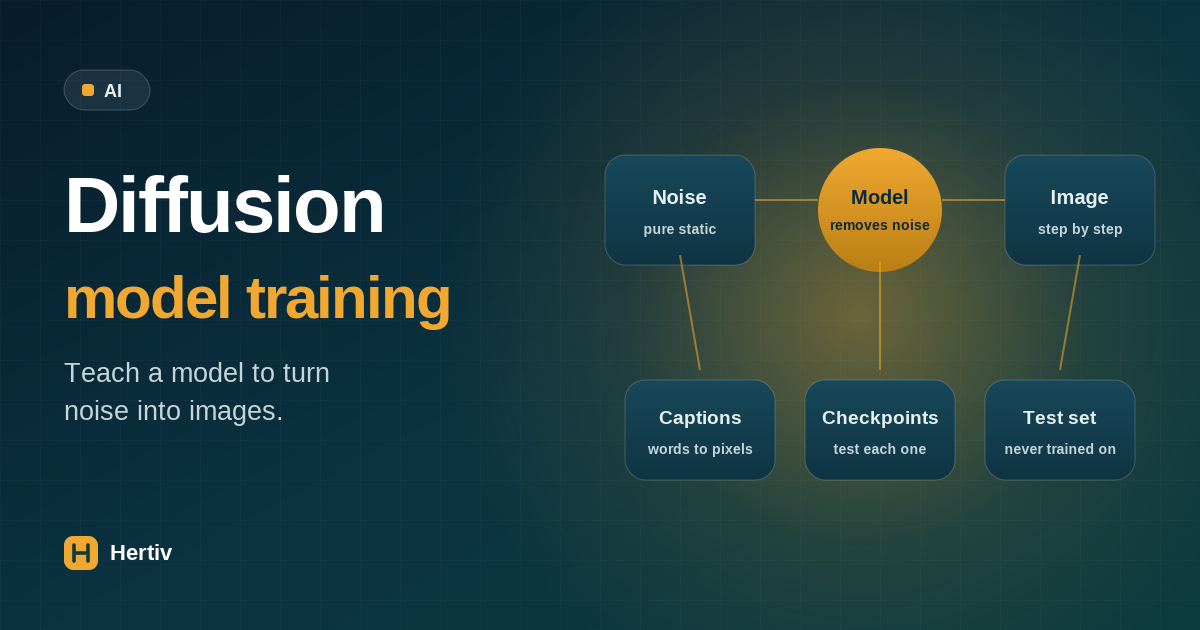
A diffusion model is a type of generative model that learns to turn noise into an image by reversing a gradual noising process. During training, the model sees an image with a known amount of noise added and learns to predict the noise, so it can remove it.
At generation time, the model starts from pure noise and removes a little of it at a time, over many steps, until an image appears. Each step is a small correction, which is why diffusion images can look detailed and coherent: the model refines the image gradually instead of guessing it all at once.
Diffusion models are used for image generation, editing and inpainting, and the same idea works for audio and video. The training recipe below applies to images, which is the most common case and the easiest to judge by eye.
What data do you need to train a diffusion model?
You need a large set of clean, captioned images that match the kind of images you want the model to make. The captions describe what is in each image, so the model learns the link between words and pixels.
| Data item | What it does | What good looks like |
|---|---|---|
| Images | Teaches shapes, textures, styles | Sharp, varied, on-topic |
| Captions | Links words to image content | Specific, accurate, consistent |
| Duplicates removed | Stops memorisation of one image | No near-identical copies |
| Licence checked | Keeps the dataset legal to use | Rights confirmed for every source |
| Held-out test set | Measures real progress | Never used in training |
Data quality matters more than data size. A smaller set of sharp, well-captioned images usually beats a huge set of blurry, mislabelled ones, because the model learns whatever patterns the data contains, including the bad ones.
Keep a test set aside from the start and never train on it. Without it, you cannot tell whether the model is learning general patterns or just memorising the training images, and the difference only shows up when real users try it.
How do you train a diffusion model, step by step?
You train a diffusion model by preparing the data, choosing a starting point, running the training loop, and checking the outputs at fixed intervals. The steps below assume you are fine-tuning a small model or training a modest one, not building a frontier model from scratch.
- Define the task. Decide what the model should draw, in what style, and at what size.
- Prepare the data. Clean, caption and split the images, and hold out a test set.
- Pick a starting point. Fine-tuning a public base model is far cheaper than training from scratch.
- Set the training loop. Choose the noise schedule, batch size, learning rate and number of steps.
- Train in short runs. Save checkpoints regularly so you can go back to the best one.
- Check the outputs. Generate a fixed set of test prompts at each checkpoint and compare them.
- Stop at the best checkpoint. More training is not always better; over-training makes images repetitive.
Fine-tuning is the right choice for most teams. Training from scratch needs far more data and compute, and the result is usually worse than a good fine-tune of a model that already understands images. Start from a base model, teach it your style and subject, and measure the result.
What hardware and compute do you need?
What you need depends on the model size and the image size. A small fine-tune can run on a single good graphics card, while a large model at high resolution needs several cards and much more memory.
The main costs are the graphics cards, the storage for the dataset and checkpoints, and the time the training runs. A run that takes a week on one card takes about a day on seven, but only if the setup scales well, which is not guaranteed. Test scaling on a short run before paying for a long one.
Watch the memory, not just the speed. The model, the optimiser state and the batch all share the same memory, and running out mid-run wastes the whole run. Start with a small batch, check the memory use, and grow it only while the run stays stable.
For a sense of the wider costs, read how to build an AI proof of concept, which covers the same budgeting habits: a small pilot, a fixed test set and a decision point before spending more.
How do you know the model is improving?
You know a diffusion model is improving when the same test prompts produce better images at each checkpoint, and when the model still handles prompts it has not seen. Judging by eye is the first check, but it should not be the only one.
Keep a fixed set of test prompts that cover your main subjects, styles and edge cases, and generate them at every checkpoint. Compare the images side by side, and note which checkpoint is best for each prompt type. A model that improves on one type and gets worse on another is over-fitting to part of the data.
Also test prompts the model has not seen, because a model that only works on training prompts has memorised rather than learned. If new prompts produce broken images while old ones look good, the model needs more varied data or fewer training steps, not more compute.
Example (hypothetical): fine-tuning a product-image model
Example (hypothetical): a small shop wants a model that draws its products in a consistent style for listings. The team collects 2,000 photos of its products, captions each one, and holds out 200 photos as a test set, leaving 1,800 for training.
They fine-tune a small public base model for 10,000 steps at a batch size of 8, which is 80,000 image views in total, or about 44 passes over the 1,800 training images. The run takes 20 hours on one graphics card, and they save a checkpoint every 2,000 steps.
At the 6,000-step checkpoint, the test prompts look best: products are correct and the style is consistent. At 10,000 steps, the images look sharper but the model repeats the same backgrounds, a sign of over-training. They ship the 6,000-step checkpoint and keep the test set for the next round.
What are the common mistakes?
The most common diffusion training mistakes are bad captions, no test set, and training for too long. Each one wastes the run that follows it.
- Vague captions. "A nice picture" teaches nothing; captions should say what is in the image.
- No held-out test set. Without one, you cannot tell learning from memorisation.
- Training too long. More steps past the best checkpoint make images repetitive, not better.
- Dirty data. Blurry, duplicated or mislabelled images teach the model the wrong patterns.
- No licence check. Images you have no right to train on can create legal trouble later.
Key takeaways
- A diffusion model learns to remove noise step by step, turning random noise into an image
- Clean, captioned, licensed data matters more than a huge, messy dataset
- Fine-tuning a public base model is cheaper and usually better than training from scratch
- Judge progress with a fixed test prompt set at every checkpoint, and stop at the best one
- Bad captions, no test set and over-training are the three mistakes that waste a run
Frequently asked questions
How long does it take to train a diffusion model?
It depends on the model size, the data and the hardware. A small fine-tune can take hours on one graphics card, while a large model can take weeks on many cards. Short runs with regular checkpoints let you stop at the best result.
Can I train a diffusion model on a single graphics card?
Yes, for a small model or a fine-tune. The limits are memory and time: the model, the optimiser and the batch must fit in memory, and a run that takes a day on one card takes longer than on several. Start small and measure before scaling up.
What is the difference between training and fine-tuning?
Training from scratch teaches a model everything from random starting weights, which needs huge data and compute. Fine-tuning starts from a public base model and teaches it a new style or subject, which needs far less data and time.
How many images do I need?
There is no fixed number, but quality beats quantity. A few thousand clean, well-captioned images can fine-tune a model for one subject, while a broad model needs far more. Hold out a test set and measure the result before adding more data.
What is a noise schedule?
A noise schedule sets how much noise is added at each step of the training process. It controls the balance between learning broad shapes and fine details, and most teams start with the schedule that ships with their base model.
Why do my generated images look repetitive?
Repetition usually means over-training or too little data variety. Try an earlier checkpoint, add more varied images, or reduce the number of training steps, and check the result on prompts the model has not seen.


