Agentic RAG in Enterprise: How to Implement It Safely
Agentic RAG lets an AI agent plan, search and check enterprise data before answering. Learn how it works, what it needs and how to roll it out safely.
On this page
Short answer
Agentic RAG in an enterprise is a retrieval setup where an AI agent plans a task, searches company documents and data, checks what it finds, and then answers or acts. Unlike plain RAG, which runs one search per question, the agent can run several searches, compare results and ask further questions. It fits support, research and operations work where the answer must come from company sources and be checked first.
What is agentic RAG in an enterprise?
Agentic RAG is a retrieval setup in which an AI agent plans how to answer a question, searches enterprise documents and data, checks what it finds, and then answers or acts. The agent works in a loop: it breaks the question into smaller searches, reads the results, and decides whether it has enough to answer or needs to search again.
Plain RAG runs one search for each question and hands the top results to the model. Agentic RAG adds planning and checking, so it can handle questions that need several sources, such as a policy question that depends on a contract, a price list and a support log. The agent can also use tools, such as a database query or a calculator, before it answers.
The enterprise part matters because the data is private, messy and spread across systems. Documents sit in drives, wikis, ticket systems and databases, and each has its own access rules. An enterprise agentic RAG system must respect those rules, so the agent only sees what the asking user is allowed to see.
| Feature | Plain RAG | Agentic RAG |
|---|---|---|
| Searches per question | One | Several, planned by the agent |
| Checking | None | Agent compares and checks sources |
| Tools | No | Yes, such as database queries |
| Best for | Simple lookups | Multi-step questions |
For the basic pattern, RAG development starts with the same grounding idea, then adds the agent loop on top.
How does agentic RAG work?
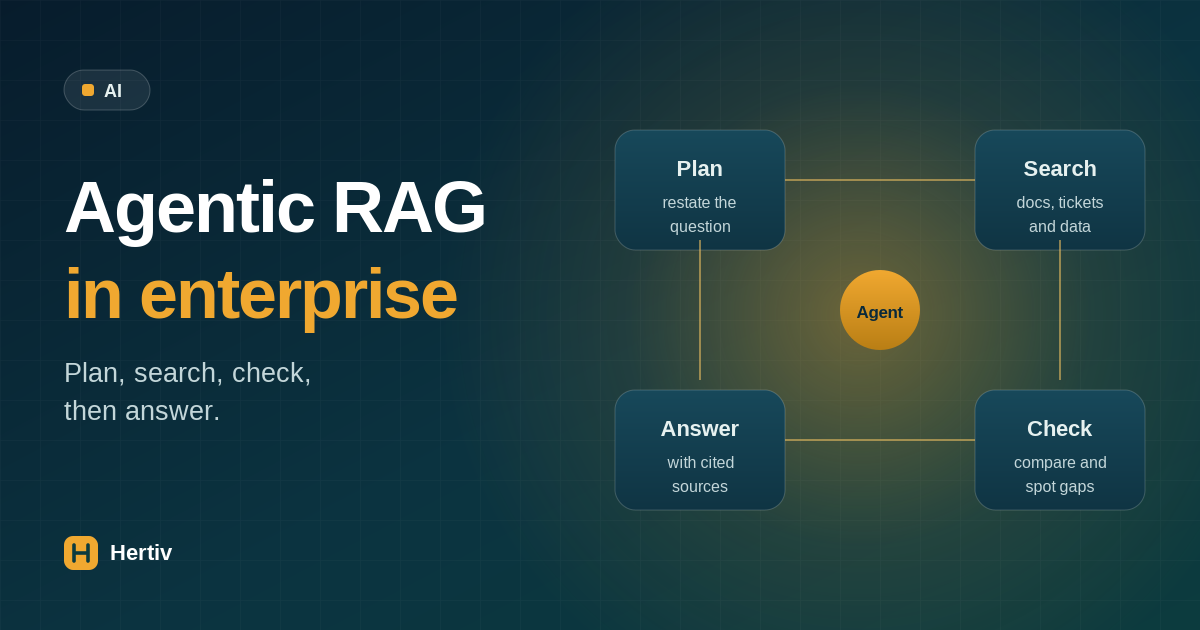
Agentic RAG works as a loop of four steps: plan, search, check and answer. The agent first restates the question and lists what it needs to find. Then it searches the indexed sources, reads the top results and judges whether they answer the question. If not, it searches again with different terms. When the evidence is enough, it writes the answer with citations to the sources it used.
A typical run looks like this:
- Receive and restate the question. The agent turns a vague request into a clear question with named facts to find.
- Plan the searches. It lists the sources to check, such as the policy wiki, the contract store and the ticket system.
- Search and read results. It runs the searches and reads the top passages, not just the titles.
- Check for gaps and conflicts. It compares sources, notes disagreements and searches again when the evidence is thin.
- Answer with sources, or hand off. It writes the answer with citations, or passes the question to a person when the sources do not cover it.
The checking step is what makes the pattern useful in an enterprise. The agent compares sources against each other, notes when they disagree, and says so instead of picking one quietly. It can also refuse to answer when the sources do not cover the question, which is safer than guessing.
What data and systems does it need?
Agentic RAG needs three things: indexed content, access rules and a place to run the agent. The content is usually documents, tickets, wiki pages and database rows, chunked and indexed so the agent can search them quickly. The access rules mirror the company's permissions, so a support agent cannot read finance files through the RAG system.
| Component | What it does | What to watch |
|---|---|---|
| Content index | Searches documents fast | Stale copies mislead the agent |
| Permissions | Limits what the agent sees | Must match the real access rules |
| Agent tools | Let the agent query and calculate | Each tool needs clear limits |
| Logging | Records every search and answer | Review it weekly |
Start with one well-organised source, such as the support knowledge base, and add more only after the first one works. A small, clean index beats a large, stale one, because the agent can only check what it can find. For the search side, what retrieval-augmented generation is explains how the underlying retrieval step works.
Where does agentic RAG help in an enterprise?
Agentic RAG helps where answers need several internal sources and a check before they are used. Customer support is the common first case: the agent reads the product docs, the known-issue list and the customer's history, then drafts a reply with sources. Research teams use it to gather evidence across reports, and operations teams use it to check a procedure against the current policy before acting.
- Support drafts with cited sources. The agent gathers the docs and the customer history, then drafts a reply a person can check.
- Research summaries across reports. It pulls evidence from several reports and flags where they disagree.
- Policy checks before approvals. It reads the current policy and the request, then lists what matches and what does not.
- Onboarding answers for new staff. New joiners ask questions and get answers drawn from the real docs, not from memory.
- Incident triage across logs and runbooks. It gathers the relevant log lines and the matching runbook steps in one place.
It fits less well for simple lookups, where plain RAG is faster and cheaper, and for decisions that need a person's judgement, where the agent should prepare the evidence and stop. The rule is simple: the more sources a question needs, the more the agent loop helps.
How to implement agentic RAG in 6 steps
You implement agentic RAG in six steps, starting with one use case and one clean source, then adding sources and tools only after the first loop works.
- Pick one use case. Support drafts or policy checks are good first cases, because the output is easy to check.
- Index one clean source. Choose the best-organised documents, fix the obvious gaps, and set a refresh schedule.
- Set the access rules. Mirror the company's permissions, so the agent never shows a user what that user cannot see.
- Build the agent loop. Add planning, searching and checking, with a limit on how many searches each question may run.
- Add a review step. A person checks the answer before it reaches a customer, and flags bad answers so the team can fix the source or the prompt.
- Measure and expand. Track answer quality, time saved and handoff rate for a month, then add the next source only if the numbers hold up.
Budget for the running costs as well as the build. Each agent loop runs several model calls per question, so the cost per question is higher than plain RAG. For the planning side, how to build an AI proof of concept shows how to scope a small pilot before committing to a full rollout.
Example (hypothetical): a support team pilots agentic RAG
Example (hypothetical): a support team handles 200 tickets a day, and each ticket takes a support agent about 8 minutes to research and answer by hand.
Two hundred tickets at 8 minutes each is 1,600 minutes a day, which is about 27 hours of research and writing. The team adds an agentic RAG pilot that reads the product docs, the known-issue list and the ticket history, then drafts a reply with sources for each ticket.
In the first month, the agent drafts replies that staff accept without changes for 120 of the 200 tickets. The other 80 need a review, which takes 3 minutes each, or 240 minutes in total, which is 4 hours. The team saves about 23 hours a day, and the review step catches the cases where the sources disagree or the question is new.
The saving comes from the drafts, not from removing the review. The 80 reviewed tickets are the ones where a person adds real value, and the team spends its time there instead of on the 120 that were fine.
What are the common mistakes?
The most common agentic RAG mistakes are indexing everything at once, skipping the access rules, and letting the agent act without a review step.
- Indexing everything at once. A huge, messy index gives the agent bad sources to check. Start with one clean source.
- Skipping the access rules. If the agent can read files the user cannot, it will leak them in its answers.
- No limit on searches. An agent without a search limit can loop for a long time on a hard question. Cap the searches per question.
- Letting the agent act unchecked. Drafts are fine, but actions such as refunds or account changes need a person's approval.
- No logging. If you cannot see what the agent searched and cited, you cannot fix a wrong answer.
- Measuring drafts, not outcomes. Count accepted answers and time saved, not how many drafts the agent produced.
Key takeaways
- Agentic RAG adds planning and checking to plain RAG, so it handles multi-step questions
- The agent loop is plan, search, check and answer, with citations to the sources used
- Access rules must mirror company permissions, or the agent will leak files in its answers
- Start with one clean source and a human review step before adding more
- Cap the searches per question and log every search so wrong answers can be fixed
Frequently asked questions
What is the difference between agentic RAG and plain RAG?
Plain RAG runs one search per question and hands the top results to the model. Agentic RAG adds an agent that plans the searches, runs several of them, compares the results and checks for gaps before answering. It handles questions that need several sources, but it costs more per question because it runs several model calls.
Do I need agentic RAG, or is plain RAG enough?
Plain RAG is enough for simple lookups from one source, such as finding a policy clause or a product fact. Agentic RAG fits when a question needs several sources, a comparison or a check, such as a support reply that depends on docs, known issues and customer history.
What data should I index first for agentic RAG?
Index the best-organised source for your first use case, such as the support knowledge base or the policy wiki. Fix obvious gaps and set a refresh schedule before adding a second source. A small, clean index gives better answers than a large, stale one.
How do I keep agentic RAG from leaking private data?
Mirror the company's access rules in the retrieval step, so the agent only searches what the asking user can see. Test with users from different teams, log what the agent reads, and review the logs weekly for anything the agent should not have shown.
How much does agentic RAG cost to run?
It costs more per question than plain RAG, because each question runs several searches and model calls. The total depends on volume, the model used and the search limit per question. Run a small pilot, measure the cost per answered question, and compare it with the time saved.
Can agentic RAG take actions, or only answer questions?
It can take actions if you give it tools, such as updating a ticket or querying a database, but each tool needs clear limits and a review step. Start with answers and drafts only, and add actions one at a time after the review step proves the agent is reliable.


